


Modify ↓
Opened 17 years ago
Closed 17 years ago
#4708 closed enhancement (fixed)
[PATCH] OAuth dialog default window size should be enlarged
| Reported by: | Claudius | Owned by: | team |
|---|---|---|---|
| Priority: | minor | Milestone: | |
| Component: | Core | Version: | |
| Keywords: | Cc: |
Description
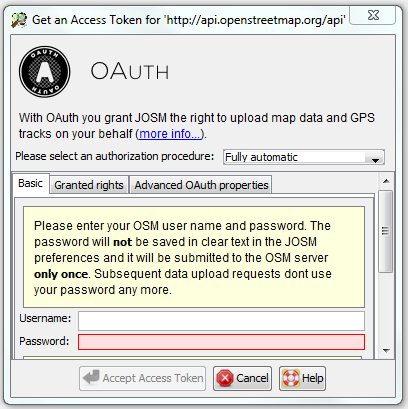
If you open the OAuth dialog on a blank JOSM installation the default window dimensions require a vertical toolbar to be shown. Thus the "Authorize" button is not visible and the user only sees a disabled "Accept Access Token" button. See attached screenshot
The default window dimensions should be enlarged to have it visible. There are not issues with that even on small screens.
Attachments (3)
Change History (5)
by , 17 years ago
| Attachment: | OAUth_current.png added |
|---|
by , 17 years ago
| Attachment: | OAUth_proposed.png added |
|---|
by , 17 years ago
| Attachment: | OAuth_wizard_windowsize.patch added |
|---|
comment:1 by , 17 years ago
| Summary: | OAuth dialog default window size should be enlarged → [PATCH] OAuth dialog default window size should be enlarged |
|---|
comment:2 by , 17 years ago
| Resolution: | → fixed |
|---|---|
| Status: | new → closed |
Note:
See TracTickets
for help on using tickets.



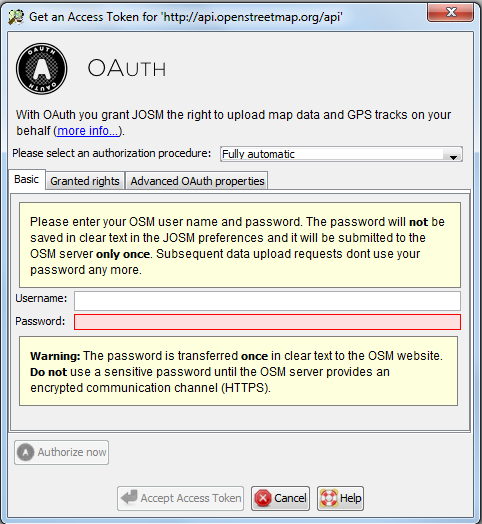
Enlarges OAuth Wizard dialog to not show a scrollbar