


Opened 17 years ago
Closed 17 years ago
#2835 closed enhancement (invalid)
Proxy Einstellungen
| Reported by: | jeggert | Owned by: | team |
|---|---|---|---|
| Priority: | major | Milestone: | |
| Component: | unspecified | Version: | |
| Keywords: | Proxy | Cc: |
Description
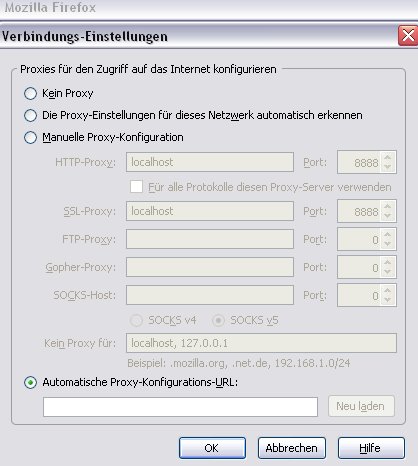
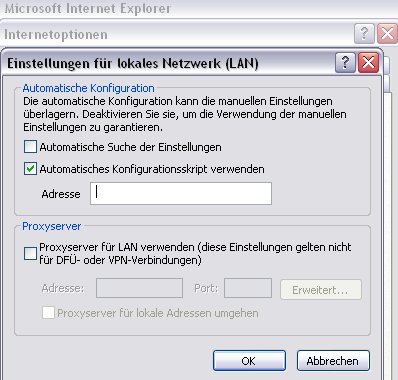
Ist es möglich die Proxy-Einstellungen zu erweitern?
- Das man eine Proxy-Konfigurations-URL (Konfigurationsskript) eingeben kann
- Das JOSM die Einstellungen des Internet Explorers übernimmt
Attachments (2)
Change History (8)
by , 17 years ago
| Attachment: | Screenshot_003.jpg added |
|---|
comment:1 by , 17 years ago
| Component: | Core → unspecified |
|---|---|
| Priority: | trivial → major |
| Version: | latest |
comment:2 by , 17 years ago
Using the IE proxy settings can be done relatively easy in newer Java versions:
System.setProperty("java.net.useSystemProxies", "true");
This enables the proxy settings of the Java control panel and by default this uses the browser settings (of the Windows OS respectively the IE).
comment:3 by , 17 years ago
I changed the setting in the Java control panel but I can't connect to the server. Everytime I get this Message:
java.net.SocketTimeoutException: connect timed out
How can I use:
System.setProperty("java.net.useSystemProxies", "true");
comment:4 by , 17 years ago
That line was for the developers to be integrated in JOSM.
As an end user you can set this property via command line on JOSM start-up:
java -jar josm-tested.jar -Djava.net.useSystemProxies=true
comment:5 by , 17 years ago
That will perhaps work, but to use JOSM at work I need configure script. At this script i have to insert my username and password.
How do I change the settings in JOSM?
comment:6 by , 17 years ago
| Resolution: | → invalid |
|---|---|
| Status: | new → closed |
It only works with the JOSM-Webstart edition!



Einstellungen Firefox