


Opened 17 years ago
Closed 15 years ago
#2778 closed defect (fixed)
mappaint.useRealWidth does not honor zoom level
| Reported by: | anonymous | Owned by: | team |
|---|---|---|---|
| Priority: | minor | Milestone: | |
| Component: | Internal mappaint style | Version: | |
| Keywords: | Cc: |
Description
I set the above option to true, the width of lines containing a "width" attribute are painted proportional to that value, but the same thickness is used in every zoom level. Default width (no width attribute set) is zoomed the correct way.
Version: 1690, 1694
Attachments (2)
Change History (7)
comment:1 by , 17 years ago
| Component: | Core → Internal mappaint style |
|---|---|
| Resolution: | → invalid |
| Status: | new → closed |
comment:2 by , 17 years ago
| Resolution: | invalid |
|---|---|
| Status: | closed → reopened |
the realwidht for the tested style ('highway'='residential') is set in the xml file.
Am I missing something?
comment:3 by , 17 years ago
| Resolution: | → worksforme |
|---|---|
| Status: | reopened → closed |
Beside the obvious typo realwidht, you may double check mappaint.useRealWidth is really set to true - that dialog is sometimes a bit strange.
Zoom in very deep (scale shows e.g. only 5m).
The default style contains working examples, do they work on your installation?
I've double checked with Version 1669, the real width function is working exactly as expected.
comment:4 by , 17 years ago
| Resolution: | worksforme |
|---|---|
| Status: | closed → reopened |
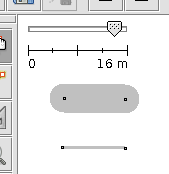
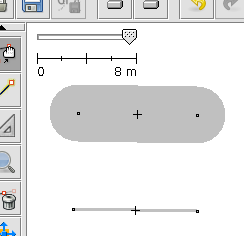
Here is an example: I drew two highway=residential
the above is without, the lower one with width=3 set.
shown in 2 different zoom versions. (build 2343)
by , 17 years ago
comment:5 by , 15 years ago
| Resolution: | → fixed |
|---|---|
| Status: | reopened → closed |
I believe this has been fixed in the meantime. At least the example you described works fine, i.e. both ways are enlarged on zoom in and not only the one without a specific width set.



Objects that should be displayed depending on the zoom level must have an additional "realwidth" attribute in the elemstyles.xml (or alike) file. Have a look at the motorway and alike rules for further details.