Modify ↓
Opened 2 months ago
#24853 new defect
Icons from ZIP file doesn't show in <list_entry>
| Reported by: | Owned by: | team | |
|---|---|---|---|
| Priority: | normal | Milestone: | |
| Component: | Core | Version: | |
| Keywords: | template_report | Cc: |
Description
What steps will reproduce the problem?
- Add the attached ZIP to presets in JOSM preferences
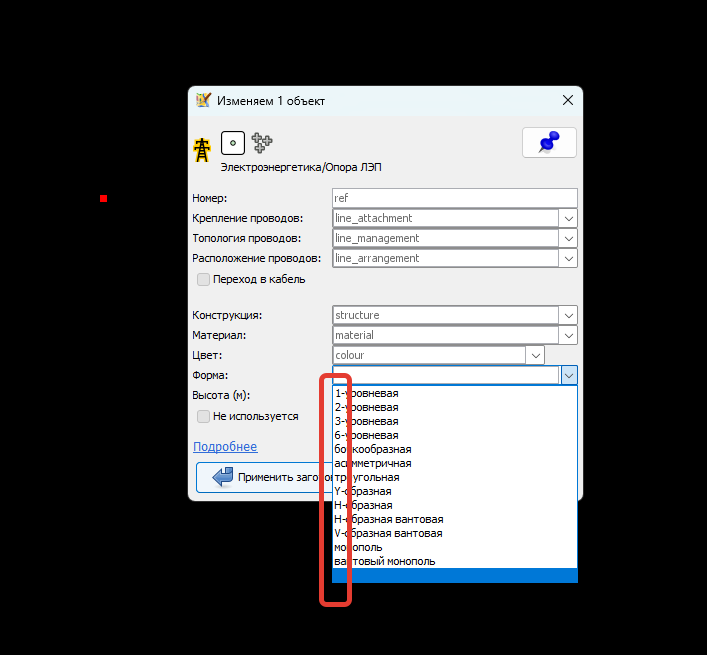
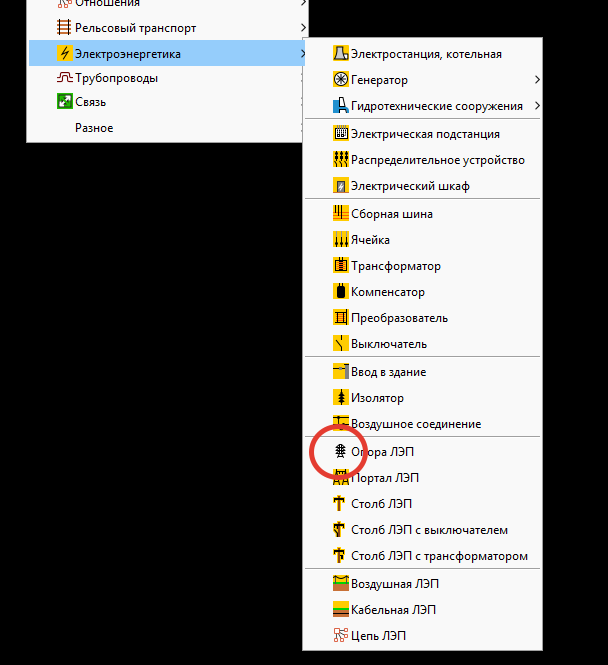
- Draw a point, try to apply to it newly appeared in menu preset "Электроэнергетика/Опора ЛЭП"
- In preset dialog expand any combo list of "Топология проводов", "Форма"
What is the expected result?
List entries should have icons, as pointed in lines 250-257 & 291-303 in Presets.xml (inside attached ZIP)
What happens instead?
No icons are shown (screenshot 1). In report there are lines about missing corresponding icons. But if edit XML and put any of "missed" icons to <item> tag (not to <list_entry>) - it shows good (screenshot 2). It means, that location of icon inside ZIP and link to it in XML are ok, and the problem in inside JOSM processing.
Please provide any additional information below. Attach a screenshot if possible.
Revision:19613
Build-Date:2026-08-12 01:42:58

Identification: JOSM/1.5 (19613 ru) Windows 11 64-Bit
OS Build number: Windows 10 Enterprise 23H2 (22631)
Memory Usage: 336 MB / 24336 MB (148 MB allocated, but free)
Java version: 21.0.12+8-LTS, Azul Systems, Inc., OpenJDK 64-Bit Server VM
Look and Feel: com.sun.java.swing.plaf.windows.WindowsLookAndFeel
Screen: \Display0 1920x1200x32bpp@60Hz (scaling 1.00×1.00)
Maximum Screen Size: 1920×1200
Best cursor sizes: 16×16→32×32, 32×32→32×32
System property file.encoding: UTF-8
System property sun.jnu.encoding: Cp1251
Locale info: ru_RU
Numbers with default locale: 1234567890 -> 1234567890
VM arguments: [-Djpackage.app-version=1.5.19613, -XX:MaxRAMPercentage=75.0, --add-modules=java.scripting,java.sql,javafx.controls,javafx.media,javafx.swing,javafx.web, --add-exports=java.base/sun.security.action=ALL-UNNAMED, --add-exports=java.desktop/com.sun.imageio.plugins.jpeg=ALL-UNNAMED, --add-exports=java.desktop/com.sun.imageio.spi=ALL-UNNAMED, --add-opens=java.base/java.lang=ALL-UNNAMED, --add-opens=java.base/java.nio=ALL-UNNAMED, --add-opens=java.base/jdk.internal.loader=ALL-UNNAMED, --add-opens=java.base/jdk.internal.ref=ALL-UNNAMED, --add-opens=java.desktop/javax.imageio.spi=ALL-UNNAMED, --add-opens=java.desktop/javax.swing.text.html=ALL-UNNAMED, --add-opens=java.prefs/java.util.prefs=ALL-UNNAMED, -Djpackage.app-path=%UserProfile%\AppData\Local\JOSM\JOSM.exe]
Dataset consistency test: No problems found

Plugins:
+ FastDraw (36503)
+ alignways (36493)
+ reverter (36503)
+ undelete (36503)
+ utilsplugin2 (36503)

Tagging presets:
+ %UserProfile%\JOSM\Railway.zip
+ %UserProfile%\JOSM\Power.zip
+ %UserProfile%\JOSM\Misc.zip

Map paint styles:
+ %UserProfile%\JOSM\Railway.zip
+ %UserProfile%\JOSM\Power.zip
+ %UserProfile%\JOSM\Misc.zip

Last errors/warnings:
- 00021.797 E: Не удалось найти изображение «Icons/line-management-straight.png»
- 00021.798 E: Не удалось найти изображение «Icons/line-management-branch.png»
- 00021.829 E: Не удалось найти изображение «Icons/line-management-straight.png»
- 00021.831 E: Не удалось найти изображение «Icons/line-management-branch.png»
- 00021.862 E: Не удалось найти изображение «Icons/line-management-straight.png»
- 00021.864 E: Не удалось найти изображение «Icons/line-management-branch.png»
- 00021.898 E: Не удалось найти изображение «Icons/line-management-straight.png»
- 00021.900 E: Не удалось найти изображение «Icons/line-management-branch.png»
- 00021.931 E: Не удалось найти изображение «Icons/line-management-straight.png»
- 00021.933 E: Не удалось найти изображение «Icons/line-management-branch.png»
Attachments (3)
Change History (3)
by , 2 months ago
by , 2 months ago
| Attachment: | Screenshot 1.png added |
|---|
by , 2 months ago
| Attachment: | Screenshot 2.png added |
|---|
Note:
See TracTickets
for help on using tickets.