


Opened 4 months ago
Closed 4 months ago
#24769 closed defect (othersoftware)
JOSM opens 3gpp audio files in Firefox, does not respect system association (Windows 11)
| Reported by: | Pontiac_CZ | Owned by: | team |
|---|---|---|---|
| Priority: | normal | Milestone: | |
| Component: | Core | Version: | |
| Keywords: | template_report | Cc: |
Description (last modified by )
JOSM now opens .3gpp files created by OSMTracker in my Firefox 151.0.4 on Win 11. I did not change anything, 3gpp files are associated with MPC-HC. I can verify this in "Default apps" or just by clicking 3gpp, they open in MPC-HC as usual.
There were a couple of Windows updates during recent weeks, might that be the cause?
What steps will reproduce the problem?
- open your GPX tracklog made by OSMTracker in JOSM, along with 3GPP audio files. You may open older tracklogs, I have just verified the issue with a half a year old one.
- click an audio in JOSM
- it opens in Firefox. Somehow the current version directly launches my browser instead of passing the audio file to the system to be opened in the associated application.
What is the expected result?
I expect it open in MPC-HC which has been associated to 3gpp in my system since I configured it.
What happens instead?
It opens in Firefox which in turn says "no video with supported format and MIME type found"
Please provide any additional information below. Attach a screenshot if possible.
Relative:URL: ^/trunk
Repository:UUID: 0c6e7542-c601-0410-84e7-c038aed88b3b
Last:Changed Date: 2026-03-28 20:28:41 +0100 (Sat, 28 Mar 2026)
Revision:19555
Build-Date:2026-03-29 01:30:57
URL:https://josm.openstreetmap.de/svn/trunk

Identification: JOSM/1.5 (19555 en_GB) Windows 11 64-Bit
OS Build number: Windows 10 Pro 25H2 (26200)
Memory Usage: 576 MB / 16168 MB (286 MB allocated, but free)
Java version: 21.0.11+10-LTS, Azul Systems, Inc., OpenJDK 64-Bit Server VM
Look and Feel: com.sun.java.swing.plaf.windows.WindowsLookAndFeel
Screen: \Display0 2560x1440x32bpp@60Hz (scaling 1.00×1.00) \Display1 2560x1440x32bpp@60Hz (scaling 1.00×1.00)
Maximum Screen Size: 2560×1440
Best cursor sizes: 16×16→32×32, 32×32→32×32
System property file.encoding: UTF-8
System property sun.jnu.encoding: Cp1250
Locale info: en_GB
Numbers with default locale: 1234567890 -> 1234567890
VM arguments: [-Dicedtea-web.bin.location=C:\Program Files\OpenWebStart\javaws, -Djava.util.Arrays.useLegacyMergeSort=true, --add-reads=java.base=ALL-UNNAMED,java.desktop, --add-reads=java.desktop=ALL-UNNAMED,java.naming, --add-reads=java.naming=ALL-UNNAMED,java.desktop, --add-exports=java.desktop/sun.awt=ALL-UNNAMED,java.desktop, --add-exports=java.desktop/javax.jnlp=ALL-UNNAMED,java.desktop, --add-exports=java.base/com.sun.net.ssl.internal.ssl=ALL-UNNAMED,java.desktop, --add-exports=java.base/sun.net.www.protocol.jar=ALL-UNNAMED,java.desktop, --add-exports=java.base/sun.security.action=ALL-UNNAMED,java.desktop, --add-exports=java.base/sun.security.provider=ALL-UNNAMED,java.desktop, --add-exports=java.base/sun.security.util=ALL-UNNAMED,java.desktop, --add-exports=java.base/sun.security.validator=ALL-UNNAMED,java.desktop, --add-exports=java.base/sun.security.x509=ALL-UNNAMED,java.desktop, --add-exports=java.base/jdk.internal.util.jar=ALL-UNNAMED,java.desktop, --add-exports=java.base/sun.net.www.protocol.http=ALL-UNNAMED,java.desktop, --add-exports=java.desktop/sun.awt.X11=ALL-UNNAMED,java.desktop, --add-exports=java.desktop/sun.applet=ALL-UNNAMED,java.desktop,jdk.jsobject, --add-exports=java.naming/com.sun.jndi.toolkit.url=ALL-UNNAMED,java.desktop, --add-modules=java.scripting,java.sql,javafx.controls,javafx.media,javafx.swing,javafx.web, --add-exports=java.desktop/com.apple.eawt=ALL-UNNAMED, --add-exports=java.desktop/com.sun.imageio.spi=ALL-UNNAMED, --add-exports=java.desktop/com.sun.imageio.plugins.jpeg=ALL-UNNAMED, --add-exports=javafx.graphics/com.sun.javafx.application=ALL-UNNAMED, --add-exports=jdk.deploy/com.sun.deploy.config=ALL-UNNAMED, --add-opens=java.base/java.lang=ALL-UNNAMED, --add-opens=java.base/java.nio=ALL-UNNAMED, --add-opens=java.base/jdk.internal.loader=ALL-UNNAMED, --add-opens=java.base/jdk.internal.ref=ALL-UNNAMED, --add-opens=java.desktop/javax.imageio.spi=ALL-UNNAMED, --add-opens=java.desktop/javax.swing.text.html=ALL-UNNAMED, --add-opens=java.prefs/java.util.prefs=ALL-UNNAMED, -Djava.security.manager=allow]

Plugins:
+ DirectUpload (36474)
+ contourmerge (v0.2.2)
+ reverter (36474)
+ undelete (36474)

Map paint styles:
- https://pasharm.github.io/New_basic_style_for_JOSM/New_basic_style.mapcss

Last errors/warnings:
- 00000.533 W: extended font config - overriding 'filename.Malgun_Gothic=malgun.ttf' with 'MALGUN.TTF'
- 00000.535 W: extended font config - overriding 'filename.Myanmar_Text=mmrtext.ttf' with 'MMRTEXT.TTF'
- 00000.535 W: extended font config - overriding 'filename.Mongolian_Baiti=monbaiti.ttf' with 'MONBAITI.TTF'
Attachments (1)
Change History (8)
comment:1 by , 4 months ago
| Description: | modified (diff) |
|---|
comment:2 by , 4 months ago
| Description: | modified (diff) |
|---|
comment:3 by , 4 months ago
| Resolution: | → othersoftware |
|---|---|
| Status: | new → closed |
comment:4 by , 4 months ago
The web browser call seems to be hardcoded into the current version.
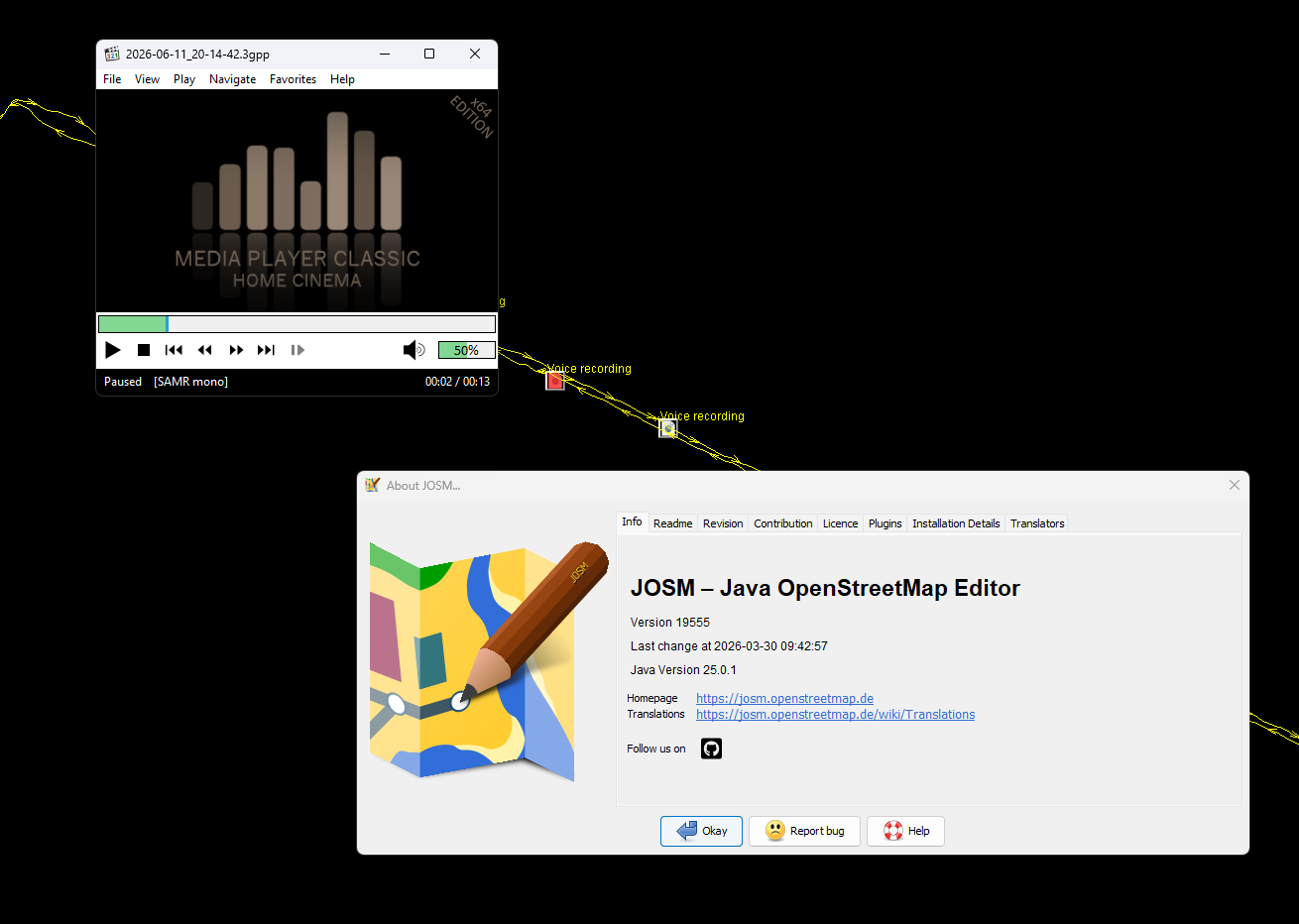
I did a test five minutes ago: I downloaded stable version 19555 (2026-03-30) from https://github.com/JOSM/josm/releases/tag/19555-tested (specifically JOSM-Windows-java21-19555.jar) and launched it. I dragged'n'dropped my GPX track with 3GPP files into it. The 3GPP files open in MPC-HC just as expected.

This means my Java environment is not at fault, something changed within the JOSM.
I looked into the advanced settings before creating this ticket, did not find anything that would help me.
comment:5 by , 4 months ago
| Resolution: | othersoftware |
|---|---|
| Status: | closed → reopened |
I am reopening this ticket. The cause is within the current version of JOSM, version 19555 opens audio files in associated program as expected.
comment:6 by , 4 months ago
Oh, this is weird. Now I see that the current version is 19555 as well, just the one that got downloaded using .jnlp, is for Java 21 and has the issue described above.
The manually downloaded 19555 for Java 25 opens 3gpp files in MPC-HC...
comment:7 by , 4 months ago
| Resolution: | → othersoftware |
|---|---|
| Status: | reopened → closed |
When you use JNLP, the you're used the "WebStart" variant and not the installed software. As the name says it is linked to the web, i.e. the browser. It works a little different in some aspects which aren't relevant for most users.


I don't use Windows myself, so I can't test this directly, but JOSM relies entirely on Java's native system integration to open these files.
Even if MPC-HC is your default when double-clicking a file, Windows keeps multiple hidden layers for file handlers (like MIME types). A recent Windows or Firefox update likely shifted those background priorities, causing Java to hand the file to the browser instead.
I suggest to check JOSM advanced preference settings if something is manually configured in a strange way and try different file types if the same happens (e.g. m3). That should help find you the root cause.