


Opened 3 months ago
Last modified 3 months ago
#24764 new defect
Area mapcss, datalayer, gives white background when not selected in Layers — at Version 2
| Reported by: | Allroads | Owned by: | team |
|---|---|---|---|
| Priority: | normal | Milestone: | |
| Component: | Core mappaint | Version: | tested |
| Keywords: | mapcss | Cc: |
Description (last modified by )
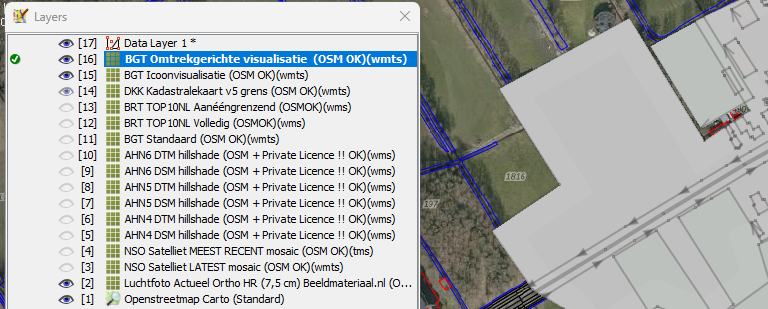
When I do not select the Data Layer 1, but other backgrounds in Layers (green icon). I get all area as white in this Data Layer 1. ( or grey if the mouseposition is not on the map)
I only have area| in the style to visualise, I was trying to visualise area landuse landcover etc. with only svg images.
This code gives the problem. ( this is a small part of the code.)
/****************************/
/* NATURAL                 */
/****************************/
/* text */
area|z27-[natural]::area_natural_base_text_layer {
	z-index: -9;
	fill-opacity:1;
	fill-image: natural_1024_text.svg;
}
/****************************/
/* Natural GRASSLAND */
/****************************/
area|z17[natural=grassland]::area_natural_layer {
	z-index: -7;
	fill-opacity:1;
	fill-image: natural_grassland_32.svg;
}
Then I set fill-opacity:1; to 0, this solved the problem. Now the white is not visible.
fill-opacity:0;
But when I delete fill-opacity: lines totaly the problem is back.
So I must set fill-opacity:0; but then I do not see the area image svg.
Uploaden data, and green icon is set, on the Data Layer 1, layer active.
When not set to set fill-opacity:0; to 1 or line deleted, the uploading proces gives also these grey background change.
Here is the online file and info about the area visualisation.
link info
Is this correct or a problem? For me a problem not seeing the images.

With |27- I visualise a svg image legend layer. (text)
Change History (3)
by , 3 months ago
| Attachment: | areajosmgrey.png added |
|---|
comment:1 by , 3 months ago
| Description: | modified (diff) |
|---|
comment:2 by , 3 months ago
| Description: | modified (diff) |
|---|
changed original post, because not seeing image.

changed url