


Modify ↓
Opened 7 months ago
Closed 7 months ago
#24654 closed defect (worksforme)
Start up JOSM plugin error
| Reported by: | TeBaMa | Owned by: | taylor.smock |
|---|---|---|---|
| Priority: | normal | Milestone: | |
| Component: | Plugin mapillary | Version: | |
| Keywords: | template_report | Cc: |
Description
What steps will reproduce the problem?
- Starting JOSM
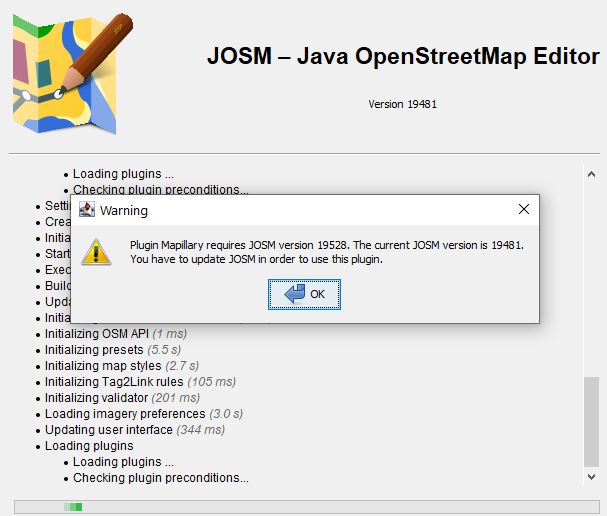
I get the following pop up:
"Plugin Mapillary JOSM version 19528. The current JOSM version is 19481.
You have to update JOSM to use this plugin."
But my version isn't requesting an update yet. And the requested version doesn't seem to exist.
The next development version: 19545
Revision:19481
Build-Date:2026-02-01 11:43:15

Identification: JOSM/1.5 (19481 en) Windows 10 64-Bit
OS Build number: Windows 10 Pro 22H2 (19045)
Memory Usage: 336 MB / 6120 MB (154 MB allocated, but free)
Java version: 21.0.10+7-LTS, Azul Systems, Inc., OpenJDK 64-Bit Server VM
Look and Feel: com.sun.java.swing.plaf.windows.WindowsLookAndFeel
Screen: \Display0 1920x1200x32bpp@60Hz (scaling 1.00×1.00)
Maximum Screen Size: 1920×1200
Best cursor sizes: 16×16→32×32, 32×32→32×32
System property file.encoding: UTF-8
System property sun.jnu.encoding: Cp1252
Locale info: en_BE
Numbers with default locale: 1234567890 -> 1234567890
VM arguments: [-Djpackage.app-version=1.5.19481, -XX:MaxRAMPercentage=75.0, --add-modules=java.scripting,java.sql,javafx.controls,javafx.media,javafx.swing,javafx.web, --add-exports=java.base/sun.security.action=ALL-UNNAMED, --add-exports=java.desktop/com.sun.imageio.plugins.jpeg=ALL-UNNAMED, --add-exports=java.desktop/com.sun.imageio.spi=ALL-UNNAMED, --add-opens=java.base/java.lang=ALL-UNNAMED, --add-opens=java.base/java.nio=ALL-UNNAMED, --add-opens=java.base/jdk.internal.loader=ALL-UNNAMED, --add-opens=java.base/jdk.internal.ref=ALL-UNNAMED, --add-opens=java.desktop/javax.imageio.spi=ALL-UNNAMED, --add-opens=java.desktop/javax.swing.text.html=ALL-UNNAMED, --add-opens=java.prefs/java.util.prefs=ALL-UNNAMED, -Djpackage.app-path=%UserProfile%\AppData\Local\JOSM\JOSM.exe]

Plugins:
+ CADTools (23)
+ Mapillary
+ PerpendicularWayFromNode (1.0.0)
+ Relation.Validation.Plugin (1.0.1)
+ ShapeTools (74)
+ apache-commons (36474)
+ auto_tools (87)
+ buildings_tools (36474)
+ fieldpapers (0.6.0)
+ mapathoner (v1.7.4)
+ mapwithai (839)
+ measurement (36474)
+ merge-overlap (36474)
+ pmtiles (36474)
+ scripting (v0.3.6)
+ splinex (36474)
+ terracer (36484)
+ todo (158)
+ turnrestrictions (36474)
+ undelete (36474)
+ utilsplugin2 (36474)

Tagging presets:
+ https://josm.openstreetmap.de/josmfile?page=Presets/BuildingPreset&zip=1

Map paint styles:
+ https://josm.openstreetmap.de/josmfile?page=Styles/iD&zip=1
+ https://josm.openstreetmap.de/josmfile?page=Styles/BuildingColors&zip=1
+ https://josm.openstreetmap.de/josmfile?page=Styles/Ph_Typhoon&zip=1
+ https://github.com/osmlab/appledata/archive/josm_paint_inline_validation.zip
+ E:\OSM\josm_styles-master.zip
+ https://josm.openstreetmap.de/josmfile?page=Styles/NodeBuildings&zip=1
- https://josm.openstreetmap.de/josmfile?page=Styles/Highway_Nodes&zip=1
+ https://josm.openstreetmap.de/josmfile?page=Styles/ColorWays&zip=1
- https://josm.openstreetmap.de/josmfile?page=Styles/MapWithAI&zip=1
- https://josm.openstreetmap.de/josmfile?page=Styles/Potlatch2&zip=1
- https://github.com/osmlab/applepaintstyles/archive/main.zip
- https://josm.openstreetmap.de/josmfile?page=Styles/NewModifiedBuildings&zip=1
- https://josm.openstreetmap.de/josmfile?page=Styles/LastUpdated&zip=1
+ E:\OSM\mm_validation.mapcss
+ https://github.com/MissingMaps/josm_styles/archive/master.zip
- https://josm.openstreetmap.de/josmfile?page=Styles/Modified&zip=1

Validator rules:
+ https://josm.openstreetmap.de/josmfile?page=Rules/ValidatingBuildingsInHOTTMProjects&zip=1

Last errors/warnings:
- 00000.665 W: extended font config - overriding 'filename.Myanmar_Text=mmrtext.ttf' with 'MMRTEXT.TTF'
- 00000.666 W: extended font config - overriding 'filename.Mongolian_Baiti=monbaiti.ttf' with 'MONBAITI.TTF'
- 00001.808 E: java.security.KeyStoreException: Windows-ROOT not found. Cause: java.security.NoSuchAlgorithmException: Windows-ROOT KeyStore not available
- 00008.269 W: Failed to load Mappaint styles from 'E:\OSM\josm_styles-master.zip'. Exception was: java.lang.IllegalArgumentException: Unknown MapCSS base selector PK
- 00008.269 E: java.lang.IllegalArgumentException: Unknown MapCSS base selector PK
- 00008.294 W: Initializing map style E:\OSM\josm_styles-master.zip completed in 5 ms (1 errors, 0 warnings)
- 00008.549 W: Failed to load Mappaint styles from 'E:\OSM\mm_validation.mapcss'. Exception was: java.nio.file.NoSuchFileException: E:\OSM\mm_validation.mapcss
- 00008.549 E: java.nio.file.NoSuchFileException: E:\OSM\mm_validation.mapcss
- 00008.551 W: Initializing map style E:\OSM\mm_validation.mapcss completed in 23 ms (1 errors, 0 warnings)
- 00013.076 W: Warning - <html>Plugin Mapillary requires JOSM version 19528. The current JOSM version is 19481.<br>You have to update JOSM in order to use this plugin.</html>
Attachments (1)
Change History (2)
by , 7 months ago
| Attachment: | Knipsel.JPG added |
|---|
comment:1 by , 7 months ago
| Resolution: | → worksforme |
|---|---|
| Status: | new → closed |
Hmm. You shouldn't have got the new version installed. Anyway now that you have it, you either can install an older plugin version manually or install the newest JOSM version (latest).
Reason is, that current Mapillary plugin needed to be adapted to changes in JOSM.
Note:
See TracTickets
for help on using tickets.


Warning Plugin Mapillar