


Modify ↓
Opened 7 months ago
Closed 7 months ago
#24618 closed defect (othersoftware)
the program becomes buggy
| Reported by: | Owned by: | team | |
|---|---|---|---|
| Priority: | normal | Milestone: | |
| Component: | Core | Version: | tested |
| Keywords: | template_report | Cc: |
Description
What steps will reproduce the problem?
- every time I open the program
- every time I edit
- every time I try to save.
What is the expected result?
that it works normally and I can read the text
What happens instead?
text becomes invisible and very messy, the screenshot will show what happens.
Please provide any additional information below. Attach a screenshot if possible.
Relative:URL: ^/trunk
Repository:UUID: 0c6e7542-c601-0410-84e7-c038aed88b3b
Last:Changed Date: 2025-08-31 14:19:57 +0200 (Sun, 31 Aug 2025)
Revision:19439
Build-Date:2025-09-02 01:30:58
URL:https://josm.openstreetmap.de/svn/trunk

Identification: JOSM/1.5 (19439 sv) Windows 11 64-Bit
OS Build number: Windows 10 Home 25H2 (26200)
Memory Usage: 380 MB / 8176 MB (126 MB allocated, but free)
Java version: 21.0.10+7-LTS, Azul Systems, Inc., OpenJDK 64-Bit Server VM
Look and Feel: com.sun.java.swing.plaf.windows.WindowsLookAndFeel
Screen: \Display0 2560x1440x32bpp@144Hz (scaling 1.00×1.00)
Maximum Screen Size: 2560×1440
Best cursor sizes: 16×16→32×32, 32×32→32×32
System property file.encoding: UTF-8
System property sun.jnu.encoding: Cp1252
Locale info: sv_SE
Numbers with default locale: 1234567890 -> 1234567890

Last errors/warnings:
- 00000.244 W: extended font config - overriding 'filename.Malgun_Gothic=malgun.ttf' with 'MALGUN.TTF'
- 00000.245 W: extended font config - overriding 'filename.Myanmar_Text=mmrtext.ttf' with 'MMRTEXT.TTF'
- 00000.245 W: extended font config - overriding 'filename.Mongolian_Baiti=monbaiti.ttf' with 'MONBAITI.TTF'
Attachments (1)
Change History (2)
by , 7 months ago
| Attachment: | josm_error.jpg added |
|---|
comment:1 by , 7 months ago
| Resolution: | → othersoftware |
|---|---|
| Status: | new → closed |
That's either a Java issue or a problem with your graphics driver. Not much we can do. Try following:
- Switch to another Look and Feel (in settings), sometimes helps
- Try switching to another Java version (i.e. 25) or check for updates
- Check system settings, display driver
- Check Internet if there are known issues with your display, driver and java combination
- Depending on how you installed and started josm it may help
- Use josm exe which contains java and josm in one package
- Install java separately, then download and start josm (there are multiple descriptions how to do that)
- On https://github.com/JOSM/josm/ you will find Windows-Exe-Files compiled and bundled with java 11, 21 and 24/25.
Note:
See TracTickets
for help on using tickets.


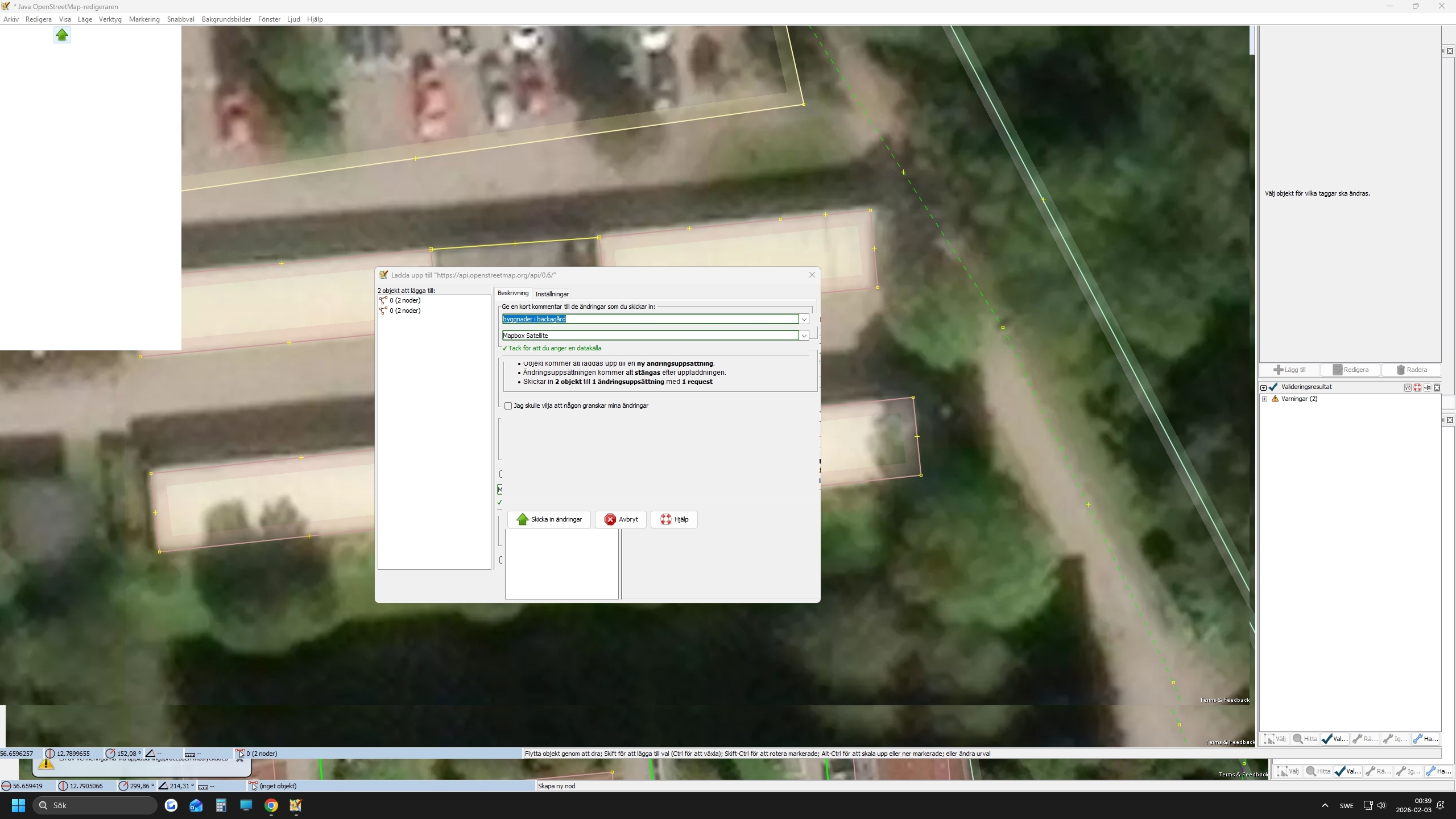
why does josm look this way? I cant read or click the right buttons.