


#24460 closed defect (othersoftware)
UrbanEye3D Crashes on Fedora Linux
| Reported by: | anonymous | Owned by: | zkir |
|---|---|---|---|
| Priority: | normal | Milestone: | |
| Component: | Plugin UrbanEye3D | Version: | |
| Keywords: | template_report | Cc: |
Description
What steps will reproduce the problem?
- Install latest version of UrbanEye3D on Fedora SilverBlue
- Launch JOSM with UrbanEye3D enabled
- Download map
What is the expected result?
UrbanEye3D renderer window should open
What happens instead?
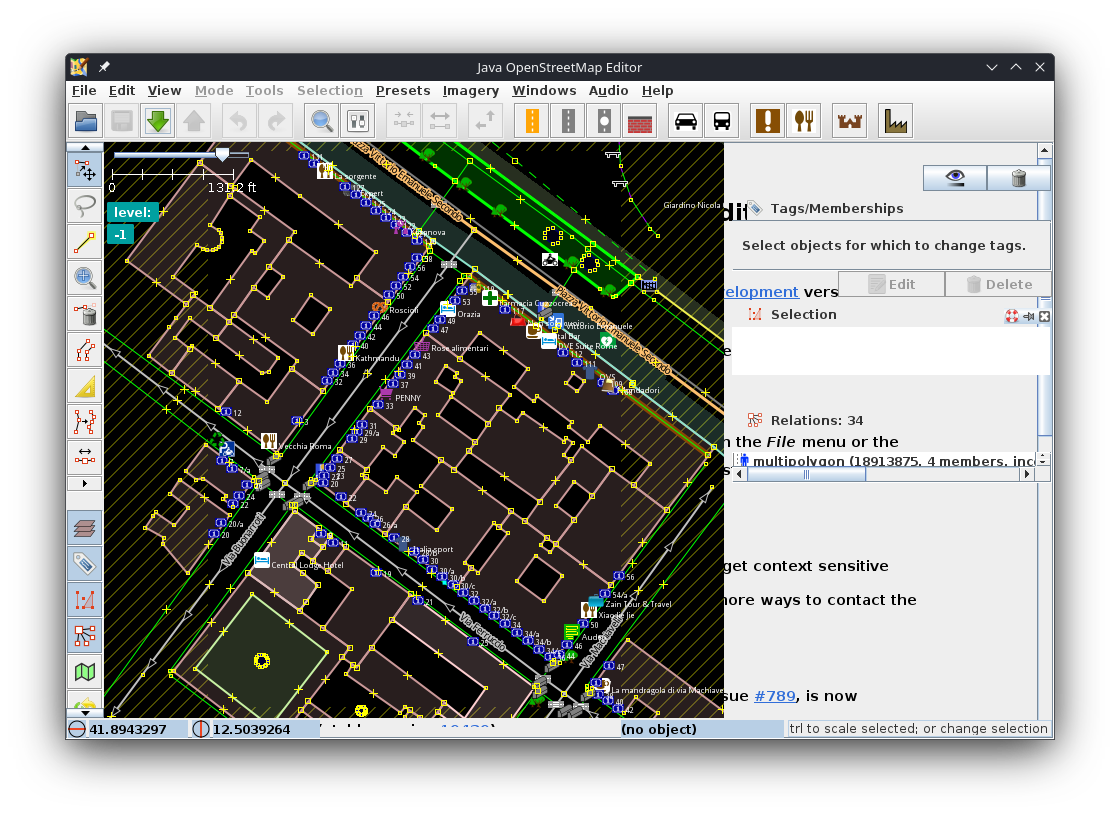
Error handler is activated and renderer does not appear. GUI elements get bugged. Whenever zooming in, error handler pops up.
Please provide any additional information below. Attach a screenshot if possible.
Relative:URL: ^/trunk
Repository:UUID: 0c6e7542-c601-0410-84e7-c038aed88b3b
Last:Changed Date: 2025-08-31 14:19:57 +0200 (Sun, 31 Aug 2025)
Revision:19439
Build-Date:2025-09-02 01:30:58
URL:https://josm.openstreetmap.de/svn/trunk

Identification: JOSM/1.5 (19439 en) Linux Freedesktop SDK 24.08 (Flatpak runtime)
Memory Usage: 352 MB / 24016 MB (254 MB allocated, but free)
Java version: 21.0.8+2, Flathub, OpenJDK 64-Bit Server VM
Look and Feel: javax.swing.plaf.metal.MetalLookAndFeel
Screen: :0.0 1920x1080x[Multi depth]@240Hz (scaling 1.00×1.00) :0.1 1366x768x[Multi depth]@[Unknown refresh rate] (scaling 1.00×1.00)
Maximum Screen Size: 1920×1080
Best cursor sizes: 16×16→16×16, 32×32→32×32
Environment variable LANG: en_US.UTF-8
System property file.encoding: UTF-8
System property sun.jnu.encoding: UTF-8
Locale info: en_US
Numbers with default locale: 1234567890 -> 1234567890
Desktop environment: KDE
VM arguments: [--module-path=/app/share/openjfx/lib, --add-modules=java.scripting,java.sql,javafx.controls,javafx.media,javafx.swing,javafx.web, -Djosm.restart=true, -Djava.net.useSystemProxies=true, -XX:MaxRAMPercentage=75.0, --add-exports=java.base/sun.security.action=ALL-UNNAMED, --add-exports=java.desktop/com.sun.imageio.plugins.jpeg=ALL-UNNAMED, --add-exports=java.desktop/com.sun.imageio.spi=ALL-UNNAMED]
Dataset consistency test: No problems found

Plugins:
+ urbaneye3d (1.4.0)

Last errors/warnings:
- 00011.613 E: Handled by bug report queue: com.jogamp.opengl.GLException: Caught GLException: No shared device for requested: null. Cause: com.jogamp.opengl.GLException: No shared device for requested: null


=== REPORTED CRASH DATA ===
BugReportExceptionHandler#handleException:
No data collected.

Warning issued by: BugReportExceptionHandler#handleException

=== STACK TRACE ===
Thread: AWT-EventQueue-0 (41) of main
com.jogamp.opengl.GLException: Caught GLException: No shared device for requested: null
	at com.jogamp.opengl.awt.GLJPanel$OffscreenBackend.initialize(GLJPanel.java:1795)
	at com.jogamp.opengl.awt.GLJPanel.initializeBackendImpl(GLJPanel.java:1377)
	at com.jogamp.opengl.awt.GLJPanel.paintComponent(GLJPanel.java:549)
	at java.desktop/javax.swing.JComponent.paint(JComponent.java:1128)
	at java.desktop/javax.swing.JComponent.paintChildren(JComponent.java:961)
	at java.desktop/javax.swing.JComponent.paint(JComponent.java:1137)
	at java.desktop/javax.swing.JComponent.paintChildren(JComponent.java:961)
	at java.desktop/javax.swing.JComponent.paint(JComponent.java:1137)
	at java.desktop/javax.swing.JComponent.paintChildren(JComponent.java:961)
	at org.openstreetmap.josm.gui.widgets.MultiSplitPane.paintChildren(MultiSplitPane.java:205)
	at java.desktop/javax.swing.JComponent.paint(JComponent.java:1137)
	at java.desktop/javax.swing.JComponent.paintChildren(JComponent.java:961)
	at java.desktop/javax.swing.JComponent.paint(JComponent.java:1137)
	at java.desktop/javax.swing.JComponent.paintChildren(JComponent.java:961)
	at java.desktop/javax.swing.JSplitPane.paintChildren(JSplitPane.java:1034)
	at java.desktop/javax.swing.JComponent.paint(JComponent.java:1137)
	at java.desktop/javax.swing.JComponent.paintChildren(JComponent.java:961)
	at java.desktop/javax.swing.JComponent.paint(JComponent.java:1137)
	at java.desktop/javax.swing.JComponent.paintChildren(JComponent.java:961)
	at java.desktop/javax.swing.JComponent.paint(JComponent.java:1137)
	at java.desktop/javax.swing.JComponent.paintChildren(JComponent.java:961)
	at java.desktop/javax.swing.JComponent.paint(JComponent.java:1137)
	at java.desktop/javax.swing.JComponent.paintToOffscreen(JComponent.java:5318)
	at java.desktop/javax.swing.BufferStrategyPaintManager.paint(BufferStrategyPaintManager.java:255)
	at java.desktop/javax.swing.RepaintManager.paint(RepaintManager.java:1336)
	at java.desktop/javax.swing.JComponent._paintImmediately(JComponent.java:5266)
	at java.desktop/javax.swing.JComponent.paintImmediately(JComponent.java:5076)
	at java.desktop/javax.swing.RepaintManager$4.run(RepaintManager.java:878)
	at java.desktop/javax.swing.RepaintManager$4.run(RepaintManager.java:861)
	at java.base/java.security.AccessController.doPrivileged(AccessController.java:400)
	at java.base/java.security.ProtectionDomain$JavaSecurityAccessImpl.doIntersectionPrivilege(ProtectionDomain.java:87)
	at java.desktop/javax.swing.RepaintManager.paintDirtyRegions(RepaintManager.java:861)
	at java.desktop/javax.swing.RepaintManager.paintDirtyRegions(RepaintManager.java:834)
	at java.desktop/javax.swing.RepaintManager.prePaintDirtyRegions(RepaintManager.java:784)
	at java.desktop/javax.swing.RepaintManager$ProcessingRunnable.run(RepaintManager.java:1897)
	at java.desktop/java.awt.event.InvocationEvent.dispatch(InvocationEvent.java:318)
	at java.desktop/java.awt.EventQueue.dispatchEventImpl(EventQueue.java:773)
	at java.desktop/java.awt.EventQueue$4.run(EventQueue.java:720)
	at java.desktop/java.awt.EventQueue$4.run(EventQueue.java:714)
	at java.base/java.security.AccessController.doPrivileged(AccessController.java:400)
	at java.base/java.security.ProtectionDomain$JavaSecurityAccessImpl.doIntersectionPrivilege(ProtectionDomain.java:87)
	at java.desktop/java.awt.EventQueue.dispatchEvent(EventQueue.java:742)
	at java.desktop/java.awt.EventDispatchThread.pumpOneEventForFilters(EventDispatchThread.java:203)
	at java.desktop/java.awt.EventDispatchThread.pumpEventsForFilter(EventDispatchThread.java:124)
	at java.desktop/java.awt.EventDispatchThread.pumpEventsForFilter(EventDispatchThread.java:117)
	at java.desktop/java.awt.WaitDispatchSupport$2.run(WaitDispatchSupport.java:191)
	at java.desktop/java.awt.WaitDispatchSupport$4.run(WaitDispatchSupport.java:236)
	at java.desktop/java.awt.WaitDispatchSupport$4.run(WaitDispatchSupport.java:234)
	at java.base/java.security.AccessController.doPrivileged(AccessController.java:319)
	at java.desktop/java.awt.WaitDispatchSupport.enter(WaitDispatchSupport.java:234)
	at java.desktop/java.awt.Dialog.show(Dialog.java:1079)
	at java.desktop/java.awt.Component.show(Component.java:1728)
	at java.desktop/java.awt.Component.setVisible(Component.java:1675)
	at java.desktop/java.awt.Window.setVisible(Window.java:1036)
	at java.desktop/java.awt.Dialog.setVisible(Dialog.java:1015)
	at org.openstreetmap.josm.gui.progress.swing.PleaseWaitProgressMonitor.lambda$doBeginTask$3(PleaseWaitProgressMonitor.java:255)
	at org.openstreetmap.josm.gui.progress.swing.PleaseWaitProgressMonitor.lambda$doInEDT$0(PleaseWaitProgressMonitor.java:113)
	at java.desktop/java.awt.event.InvocationEvent.dispatch(InvocationEvent.java:318)
	at java.desktop/java.awt.EventQueue.dispatchEventImpl(EventQueue.java:773)
	at java.desktop/java.awt.EventQueue$4.run(EventQueue.java:720)
	at java.desktop/java.awt.EventQueue$4.run(EventQueue.java:714)
	at java.base/java.security.AccessController.doPrivileged(AccessController.java:400)
	at java.base/java.security.ProtectionDomain$JavaSecurityAccessImpl.doIntersectionPrivilege(ProtectionDomain.java:87)
	at java.desktop/java.awt.EventQueue.dispatchEvent(EventQueue.java:742)
	at java.desktop/java.awt.EventDispatchThread.pumpOneEventForFilters(EventDispatchThread.java:203)
	at java.desktop/java.awt.EventDispatchThread.pumpEventsForFilter(EventDispatchThread.java:124)
	at java.desktop/java.awt.EventDispatchThread.pumpEventsForHierarchy(EventDispatchThread.java:113)
	at java.desktop/java.awt.EventDispatchThread.pumpEvents(EventDispatchThread.java:109)
	at java.desktop/java.awt.EventDispatchThread.pumpEvents(EventDispatchThread.java:101)
	at java.desktop/java.awt.EventDispatchThread.run(EventDispatchThread.java:90)
Caused by: com.jogamp.opengl.GLException: No shared device for requested: null
	at jogamp.opengl.GLDrawableFactoryImpl.createOffscreenDrawable(GLDrawableFactoryImpl.java:474)
	at com.jogamp.opengl.awt.GLJPanel$OffscreenBackend.initialize(GLJPanel.java:1703)
	... 69 more
Attachments (1)
Change History (8)
by , 13 months ago
| Attachment: | Screenshot_20250910_181021.png added |
|---|
comment:1 by , 13 months ago
| Component: | Core → Plugin UrbanEye3D |
|---|---|
| Owner: | changed from to |
comment:2 by , 13 months ago
Sorry guys, I cannot do much about this.
I did not manage even to run JOSM on Fedora (it throws critical error messages even before I can install plugins).
Most probably it's the issue with the graphics driver.
comment:3 by , 13 months ago
I forgot to add a few things: I tried running UrbanEye on Mesa 25.1.7 and 25.2.2 and the issue didn't change, so I do think it has something to do with the graphics driver as well.
Thank you for your response- I thought I had misconfigured something and was going crazy trying to fix it on my end! I'll use it on windows instead.
comment:4 by , 13 months ago
I'll use it on windows instead.
Yep, that can be an option.
JFYI: I've tried the plugin on Ubuntu, Linux Mint and ALT Linux, on those distributions it works OK, at least on my hardware.
comment:5 by , 13 months ago
It is reported that such problem can be fixed via just installing java (sudo dnf install java)
Fedora 42 comes with some sort of limited (headless) java installation, and flatpak does not install the full java also.
comment:6 by , 13 months ago
| Resolution: | → othersoftware |
|---|---|
| Status: | new → closed |
comment:7 by , 13 months ago
I decided to mess around with it today, and managed to get it working in Distrobox. I had to manually install a library (libXxf86vm), but once I did, it started working.
I also found a way of getting the flatpak version to work without installing or changing much. Adding --device=all when launching it from the terminal fixes it. I'm not sure if this is a great solution, but it works.
I completely left out that I'm using an immutable Linux distro, so that may add a few extra steps/other weird specific things to work around.
I had an urge to take another stab at it today, bouncing back and forth between Windows and Linux was a pain! It's funny to see we both found solutions on the same day. Thank you so much for the support!


Screenshot of broken GUI when using UrbanEye3D