


#23804 closed defect (fixed)
Authentication flow does not open browser
| Reported by: | ogor | Owned by: | ogor |
|---|---|---|---|
| Priority: | normal | Milestone: | 24.07 |
| Component: | Core | Version: | |
| Keywords: | Cc: |
Description (last modified by )
Hello!
I tried old login/pass and it's not working.
OAuth 2:
I tried automatic authentication - failed
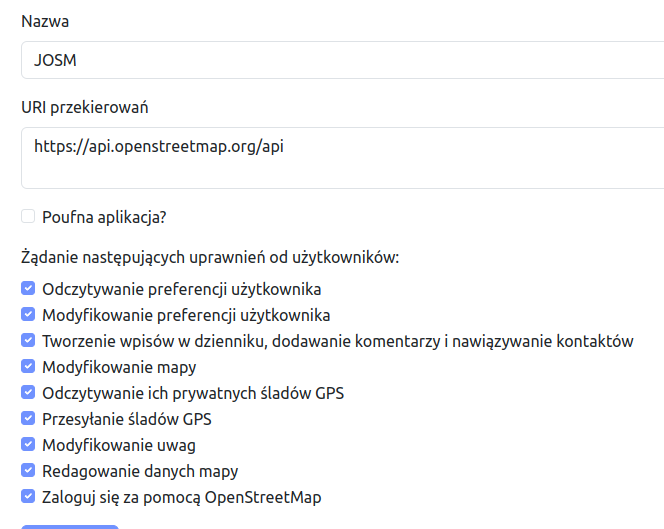
On www.openstreetmap.org I added new OAuth 2 app then copy - paste ID and secret to JOSM leaving all URLs default and it's also failing. Can somebody share step-by-step tutorial how to do it with settings on openstreetmap.org side also?
File 05_osm.org_settings.png comment: I also tried "confidential application?" checked and it doesn't help.
Relative:URL: /trunk
Repository:UUID: 0c6e7542-c601-0410-84e7-c038aed88b3b
Last:Changed Date: 2024-07-02 17:10:50 +0200 (Tue, 02 Jul 2024)
Revision:19128
Build-Date:2024-07-03 01:31:15
URL:https://josm.openstreetmap.de/svn/trunk
Attachments (5)
Change History (38)
comment:1 by , 2 years ago
| Description: | modified (diff) |
|---|
by , 2 years ago
| Attachment: | 01_settings.png added |
|---|
comment:2 by , 2 years ago
| Description: | modified (diff) |
|---|
comment:3 by , 2 years ago
| Description: | modified (diff) |
|---|
follow-up: 5 comment:4 by , 2 years ago
| Owner: | changed from to |
|---|---|
| Status: | new → needinfo |
JOSM uses remote control to receive the authorization code from OSM which is then used to get the actual OAuth 2 token.
Please see wiki:Help/Preferences/Connection#oauth2 for some troubleshooting details. If you still have problems, I'll need some more information.
The important bit is if another version of JOSM is/was running and remote control is enabled, you will have to stop remote control in the other running JOSM instances and disable/enable remote control in the current JOSM instance.
Thanks for your report, however your ticket is incomplete and therefore not helpful in its current form.
Please add all needed information according to this list:
- The required parts of the Status Report from your JOSM.
- Please, use
 Report Bug from Help menu and copy & paste.
- Please, use
- Describe what behaviour you expected.
- Describe what did happen instead.
- Describe if and how the issue is reproducible.
- Add any relevant information like error messages or screenshots.
To ensure that all technical relevant information is contained, create new tickets by clicking in JOSMs Main Menu on Help → Report Bug.
Remember: This is a generic notice so we don't need to write the same stuff again and again. It may only apply in parts to the specific case!
follow-up: 18 comment:5 by , 2 years ago
Replying to taylor.smock:
JOSM uses remote control to receive the authorization code from OSM which is then used to get the actual OAuth 2 token.
Please see wiki:Help/Preferences/Connection#oauth2 for some troubleshooting details. If you still have problems, I'll need some more information.
The important bit is if another version of JOSM is/was running and remote control is enabled, you will have to stop remote control in the other running JOSM instances and disable/enable remote control in the current JOSM instance.
I done a test with only one application running. I use OsmAnd and JOSM to login to openstreetmap.org. On OsmAnd I logged out and I had used only one instance of JOSM. It didn't helped.
Thanks for your report, however your ticket is incomplete and therefore not helpful in its current form.
Please add all needed information according to this list:
- The required parts of the Status Report from your JOSM.
- Please, use
- Describe what behaviour you expected.
- Describe what did happen instead.
- Describe if and how the issue is reproducible.
- Add any relevant information like error messages or screenshots.
To ensure that all technical relevant information is contained, create new tickets by clicking in JOSMs Main Menu on Help →
Remember: This is a generic notice so we don't need to write the same stuff again and again. It may only apply in parts to the specific case!
"Report Bug" doesn't work on my side.
Relative:URL: ^/trunk
Repository:UUID: 0c6e7542-c601-0410-84e7-c038aed88b3b
Last:Changed Date: 2024-07-02 17:10:50 +0200 (Tue, 02 Jul 2024)
Revision:19128
Build-Date:2024-07-03 01:31:15
URL:https://josm.openstreetmap.de/svn/trunk

No LSB modules are available.
Distributor ID:	Ubuntu
Description:	Ubuntu 22.04.4 LTS
Release:	22.04
Codename:	jammy

openjdk version "11.0.23" 2024-04-16
OpenJDK Runtime Environment (build 11.0.23+9-post-Ubuntu-1ubuntu122.04.1)
OpenJDK 64-Bit Server VM (build 11.0.23+9-post-Ubuntu-1ubuntu122.04.1, mixed mode, sharing)

sources.list
deb [signed-by=/usr/local/share/keyrings/josm-apt.gpg] https://josm.openstreetmap.de/apt jammy universe

Mem usage 3.7G/23.4 G

Screen size 1920x1080
Plugins, Tagging presets, Map paint styles, Validator Rules: all default (no idea how to check)
Last errors/warnings: as above
Crash & Stack: didn't catch
Threads: didn't catch
Preferences: I'll attach
comment:6 by , 2 years ago
| Owner: | changed from to |
|---|---|
| Status: | needinfo → new |
comment:7 by , 2 years ago
Hopefully you removed any sensitive information from attachments:preferences.xml (specifically old passwords).
I'll hope (and assume) you have, since you are running debian.
EDIT: If you didn't, let me know ASAP so I can delete the attachment.
follow-ups: 9 11 comment:8 by , 2 years ago
Important bits from the preferences.xml file with the sensitive information removed (actual token -> <token>):
<tag key='oauth.access-token.object.OAuth20.api.openstreetmap.org' value='{"access_token":"<token>","token_type":"bearer","created_at":1721024598,"scope":""}'/>
<tag key='oauth.access-token.parameters.OAuth20.https://api.openstreetmap.org/api' value='{"client_id":"edPII614Lm0_0zEpc_QzEltA9BUll93-Y-ugRQUoHMI","redirect_uri":"http://127.0.0.1:8111/oauth_authorization","api_url":"https://api.openstreetmap.org/api","authorize_url":"https://www.openstreetmap.org/oauth2/authorize","token_url":"https://www.openstreetmap.org/oauth2/token"}'/>
It looks like there is some sensitive data in the preferences.xml (in those two entries). I have deleted the preferences.xml attachment. It would have allowed other people to impersonate you on the OSM server.
The file was up for ~6 minutes; you may or may not be OK. I would still recommend resetting your OAuth 2 token.
Steps to do so:
- Go to https://www.openstreetmap.org/oauth2/applications
Deletethe JOSM application from this list; this will ensure that a new token is created the next time you try to authenticate with JOSM.
On to the actual problem:
It looks like the OAuth scopes are wrong; the preferences should look more like
<tag key='oauth.access-token.object.OAuth20.api.openstreetmap.org' value='{"access_token":"<token>","token_type":"Bearer","created_at":1677519511,"scope":"read_gpx write_gpx read_prefs write_prefs write_api write_notes"}'/>
<tag key='oauth.access-token.parameters.OAuth20.api.openstreetmap.org' value='{"client_id":"edPII614Lm0_0zEpc_QzEltA9BUll93-Y-ugRQUoHMI","redirect_uri":"http://127.0.0.1:8111/oauth_authorization","api_url":"https://api.openstreetmap.org/api","authorize_url":"https://www.openstreetmap.org/oauth2/authorize","token_url":"https://www.openstreetmap.org/oauth2/token"}'/>
Note that the scope should have read_gpx write_gpx read_prefs write_prefs write_api write_notes; these can be trimmed down a bit (for example, JOSM core doesn't need write_gpx but the DirectUpload plugin does).
comment:9 by , 2 years ago
Replying to taylor.smock:
(...)
The file was up for ~6 minutes; you may or may not be OK. I would still recommend resetting your OAuth 2 token.
Steps to do so:
- Go to https://www.openstreetmap.org/oauth2/applications
Deletethe JOSM application from this list; this will ensure that a new token is created the next time you try to authenticate with JOSM.
I replaced passwd and ligin with "was_there" to indicate they wasn't empty strings. Thank you.
I can't force JOSM to authenticate, so on page you mentioned JOSM is missing and that's my issue.
On to the actual problem:
It looks like the OAuth scopes are wrong; the preferences should look more like
<tag key='oauth.access-token.object.OAuth20.api.openstreetmap.org' value='{"access_token":"<token>","token_type":"Bearer","created_at":1677519511,"scope":"read_gpx write_gpx read_prefs write_prefs write_api write_notes"}'/> <tag key='oauth.access-token.parameters.OAuth20.api.openstreetmap.org' value='{"client_id":"edPII614Lm0_0zEpc_QzEltA9BUll93-Y-ugRQUoHMI","redirect_uri":"http://127.0.0.1:8111/oauth_authorization","api_url":"https://api.openstreetmap.org/api","authorize_url":"https://www.openstreetmap.org/oauth2/authorize","token_url":"https://www.openstreetmap.org/oauth2/token"}'/>Note that the scope should have
read_gpx write_gpx read_prefs write_prefs write_api write_notes; these can be trimmed down a bit (for example, JOSM core doesn't needwrite_gpxbut theDirectUploadplugin does).
Token reset done. Do you think modification of this 2 lines should help?
comment:10 by , 2 years ago
Do you think modification of this 2 lines should help?
Maybe. It wouldn't hurt to try.
comment:11 by , 2 years ago
Replying to taylor.smock:
On to the actual problem:
It looks like the OAuth scopes are wrong; the preferences should look more like
<tag key='oauth.access-token.object.OAuth20.api.openstreetmap.org' value='{"access_token":"<token>","token_type":"Bearer","created_at":1677519511,"scope":"read_gpx write_gpx read_prefs write_prefs write_api write_notes"}'/> <tag key='oauth.access-token.parameters.OAuth20.api.openstreetmap.org' value='{"client_id":"edPII614Lm0_0zEpc_QzEltA9BUll93-Y-ugRQUoHMI","redirect_uri":"http://127.0.0.1:8111/oauth_authorization","api_url":"https://api.openstreetmap.org/api","authorize_url":"https://www.openstreetmap.org/oauth2/authorize","token_url":"https://www.openstreetmap.org/oauth2/token"}'/>
I tried... No changes. Maybe manual authentication will work? But from where can I get the access key?
follow-up: 13 comment:12 by , 2 years ago
Right now, the manual authorization workflow assumes you have a key from somewhere else. I'll see if I can change it so that people can copy-paste the redirect URL.
What does the web browser redirect to, and what does it say? Please replace the code parameter with something else.
Example: http://127.0.0.1:8111/oauth_authorization?code=<code>&state=<state> returns OK.
comment:13 by , 2 years ago
Replying to taylor.smock:
Right now, the manual authorization workflow assumes you have a key from somewhere else. I'll see if I can change it so that people can copy-paste the redirect URL.
What does the web browser redirect to, and what does it say? Please replace the code parameter with something else.
Example:http://127.0.0.1:8111/oauth_authorization?code=<code>&state=<state>returnsOK.
I pus some fake data and I get:
HTTP Error 400: Bad Request
Unknown state for authorization
comment:14 by , 2 years ago
That is expected if you put in fake data -- the state parameter is used to avoid some MITM attacks. I think I should have specified what is the webpage you end up on when you go through the Authorize now (Fully automatic) flow.
comment:15 by , 2 years ago
Now I'm a little bit lost... If clicking on "Authorize now" should start a web browser with some data - it's doing completely nothing. Maybe this is also why I have no reaction for "Report Bug" from menu Help.
comment:16 by , 2 years ago
FML. Someone reported an issue with an unsupported (EOL) Ubuntu version and opening web browsers awhile back. I'll see if I can find it.
Meanwhile, can you make certain you are running a supported Ubuntu version ( https://endoflife.date/ubuntu )?
- 20.04
- 22.04
- 24.04
If you are on Debian, please upgrade to Debian 12 if you haven't already (Debian 11 is going EOL in a few weeks).
comment:17 by , 2 years ago
I now started JOSM from the shell instead of clicking on an icon. Then I used url which appeared there and looks like it's working (didn't authorize yet). So maybe for cases like mine (no web browser opening) some popup should appear?
comment:18 by , 2 years ago
Here it is:
Replying to ogor:
(...)
No LSB modules are available.
Distributor ID: Ubuntu
Description: Ubuntu 22.04.4 LTS
Release: 22.04
Codename: jammy
(...)
comment:19 by , 2 years ago
Final result: Works
How it was fixed: Start from the shell and copy-paste URL which appeared when I click on "Authorize now (Fully automatic)"
Proposal: Add at least note that web browser should be opened automatically. And maybe FAQ page with this issue?
comment:20 by , 2 years ago
So maybe for cases like mine (no web browser opening) some popup should appear?
This depends upon how the web browser fails to open. I'll have to see if I can replicate.
Can you get me a status report (see comment:4; Help -> Show Status Report)? Especially after you try to do an action that will open a web browser (like Report bug).
Description: Ubuntu 22.04.4 LTS
At least this is supported. Do you know how you installed JOSM? It looks like you did it via our debian repo.
comment:21 by , 2 years ago
| Owner: | changed from to |
|---|---|
| Status: | new → needinfo |
Also, can you copy-paste 10-20 lines prior to and after the URL being logged to console?
comment:23 by , 2 years ago
| Summary: | Can't authenticate → Authentication flow does not open browser |
|---|
comment:25 by , 2 years ago
Replying to taylor.smock:
(...)
At least this is supported. Do you know how you installed JOSM? It looks like you did it via our debian repo.
Yes, like here: https://josm.openstreetmap.de/ticket/23804#comment:5
2024-07-15 21:26:17.832 INFO: GET https://josm.openstreetmap.de/mapkey/Mapbox -> HTTP/1.1 200 (155 ms; 98 B)
2024-07-15 21:26:24.737 INFO: POST https://josm.openstreetmap.de/josmticket (1,85 kB) ...
2024-07-15 21:26:25.031 INFO: POST https://josm.openstreetmap.de/josmticket -> HTTP/1.1 200 (176 ms)
2024-07-15 21:26:25.065 INFO: Otwieranie adresu URL: https://josm.openstreetmap.de/josmticket?pdata_stored=ebdf4d45d828e96b051b14e6
Relative:URL: ^/trunk
Repository:UUID: 0c6e7542-c601-0410-84e7-c038aed88b3b
Last:Changed Date: 2024-07-02 17:10:50 +0200 (Tue, 02 Jul 2024)
Revision:19128
Build-Date:2024-07-03 01:31:15
URL:https://josm.openstreetmap.de/svn/trunk
Identification: JOSM/1.5 (19128 pl) Linux Ubuntu 22.04.4 LTS
Memory Usage: 655 MB / 5992 MB (502 MB allocated, but free)
Java version: 11.0.23+9-post-Ubuntu-1ubuntu122.04.1, Ubuntu, OpenJDK 64-Bit Server VM
Look and Feel: javax.swing.plaf.metal.MetalLookAndFeel
Screen: :0.0 1920x1080x[Multi depth]@60Hz (scaling 1.00×1.00)
Maximum Screen Size: 1920×1080
Best cursor sizes: 16×16→16×16, 32×32→32×32
Environment variable LANG: pl_PL.UTF-8
System property file.encoding: UTF-8
System property sun.jnu.encoding: UTF-8
Locale info: pl_PL
Numbers with default locale: 1234567890 -> 1234567890
Desktop environment: ubuntu:GNOME
Java package: openjdk-11-jre:amd64-11.0.23+9-1ubuntu1~22.04.1
Java ATK Wrapper package: libatk-wrapper-java:all-0.38.0-5build1
fonts-noto: fonts-noto:all-20201225-1build1
VM arguments: [--module-path=/usr/share/openjfx/lib, --add-modules=java.scripting,java.sql,javafx.controls,javafx.media,javafx.swing,javafx.web, -Djosm.restart=true, -Djava.net.useSystemProxies=true, --add-exports=java.base/sun.security.action=ALL-UNNAMED, --add-exports=java.desktop/com.sun.imageio.plugins.jpeg=ALL-UNNAMED, --add-exports=java.desktop/com.sun.imageio.spi=ALL-UNNAMED]
cache.bing.attribution.xml=1689539049
cache.capabilities-131030235=1721025154
cache.capabilities1272414997=1721022106
cache.capabilities1637351842=1721038391
cache.motd.html=1721020825
cache.motd.html.java=11.0.23
cache.motd.html.lang=Pl:
cache.motd.html.version=19128
changesetdialog.lastHeight=0
commandstack.lastHeight=0
conflict.lastHeight=20
conflict.minimized=true
conflict.visible=true
download.autorun=true
download.osm.gps=true
downloadAlongTrack.area=5.0
downloadAlongTrack.distance=100.0
draw.dialogspanel=false
draw.rawgps.colormode=0
draw.rawgps.lines=2
expert=true
filter.lastHeight=0
gpx.convert-tags.list.no=[]
gpx.convert-tags.list.yes=[time, src, name, ele, gpx:extension:osmand:segment:speed, hdop, gpx:extension:osmand:segment:bearing, gpx:extension:osmand:segment:heading]
gpx.export.colors=false
gui.geometry=x=869,y=67,width=1000,height=740
gui.maximized=true
imagery.entries=[{max-zoom=22, min-zoom=1, noTileHeaders={"X-VE-Tile-Info":["no-tile"]}, noTileChecksums={"MD5":["c13269481c73de6e18589f9fbc3bdf7e"]}, metadataHeaders={"X-VE-TILEMETA-CaptureDatesRange":"Capture Date"}, transparent=true, minimumTileExpire=3600, name=Bing - zdjęcia lotnicze, id=Bing, type=bing, url=https://www.bing.com/maps/, permission-reference-url=https://wiki.openstreetmap.org/wiki/Bing_Maps, cookies=, icon=data:image/png;base64,iVBORw0..., customHttpHeaders={}, category=photo},
{max-zoom=22, noTileHeaders={"ETag":["\"336b022ed883bc72347a637634e490d4\"|\"067736a547cafe90014b4e59b6510abe\"|\"ee1f6802b0234046b553cbbc672ac7d9\"|\"9f5a2f1d7cc131e58befc2052c71c827\""]}, noTileChecksums={"MD5":["58e78313d04adf0ea64b8de8590c3d46"]}, transparent=true, minimumTileExpire=3600, name=Mapbox - zdjęcia satelitarne, id=Mapbox, type=tms, url=https://{switch:a,b,c,d}.tiles.mapbox.com/v4/mapbox.satellite/{zoom}/{x}/{y}.jpg?access_token={apikey}, attribution-text=Terms & Feedback, attribution-url=https://www.mapbox.com/about/maps/, permission-reference-url=https://wiki.openstreetmap.org/wiki/Vertical_Aerial_Photographs#DigitalGlobe_.2F_MapBox, cookies=, icon=data:image/png;base64,iVBORw0..., customHttpHeaders={}, category=photo},
{max-zoom=22, noTileHeaders={"Etag":["\"10i954m13i2\""]}, noTileChecksums={"MD5":["f27d9de7f80c13501f470595e327aa6d"]}, transparent=true, minimumTileExpire=3600, name=Obrazowanie świata Esri, id=EsriWorldImagery, type=tms, url=https://{switch:services,server}.arcgisonline.com/arcgis/rest/services/World_Imagery/MapServer/tile/{zoom}/{y}/{x}, attribution-text=Terms & Feedback, attribution-url=https://wiki.openstreetmap.org/wiki/Esri, cookies=, icon=data:image/png;base64,iVBORw0..., customHttpHeaders={}, category=photo},
{max-zoom=22, transparent=true, minimumTileExpire=3600, name=Obrazowanie świata Esri (klarowne) - beta, id=EsriWorldImageryClarity, type=tms, url=https://clarity.maptiles.arcgis.com/arcgis/rest/services/World_Imagery/MapServer/tile/{zoom}/{y}/{x}, attribution-text=Terms & Feedback, attribution-url=https://wiki.openstreetmap.org/wiki/Esri, permission-reference-url=https://github.com/osmlab/editor-layer-index/pull/358#issuecomment-361416110, cookies=, icon=data:image/png;base64,iVBORw0..., description=Obrazy archiwum Esri, które mogą być bardziej przejrzyste i dokładniejsze niż domyślna warstwa., customHttpHeaders={}, category=photo},
{max-zoom=19, valid-georeference=true, transparent=true, minimumTileExpire=3600, name=OpenStreetMap Carto (Podstawowa), id=standard, type=tms, url=https://tile.openstreetmap.org/{zoom}/{x}/{y}.png, attribution-text=© OpenStreetMap contributors, attribution-url=https://www.openstreetmap.org/, permission-reference-url=https://wiki.osmfoundation.org/wiki/Terms_of_Use, cookies=, icon=data:image/png;base64,iVBORw0..., customHttpHeaders={}, category=osmbasedmap}
]
imagery.layers.default=[Bing, EsriWorldImagery, EsriWorldImageryClarity, Mapbox, standard]
imagery.offsetbookmarks=[]
josm.version=19128
lastAddAuthor=false
lastDirectory=${HOME}/osm
layerlist.lastHeight=205
mappaint.renderer-class-name=org.openstreetmap.josm.data.osm.visitor.paint.StyledMapRenderer
mappaint.style.known-defaults=[resource://styles/standard/elemstyles.mapcss]
mapstyle.lastHeight=0
minimap.lastHeight=0
mirror.<josm.cache>/images.https://i.imgur.com/aFlvMpM.png=[1720429098423, <josm.cache>/images/mirror_https___i.imgur.com_aFlvMpM.png]
mirror.<josm.cache>/images.https://mapa.um.warszawa.pl/img/utilImages/herb.png=[1696341827242, <josm.cache>/images/mirror_https___mapa.um.warszawa.pl_img_utilImages_herb.png]
mirror.<josm.cache>/images.https://osmlab.github.io/editor-layer-index/sources/misc/osmim-imagicode.png=[1645379456857, <josm.cache>/images/mirror_https___osmlab.github.io_editor-layer-index_sources_misc_osmim-imagicode.png]
mirror.<josm.cache>/images.https://raw.githubusercontent.com/FreemapSlovakia/freemap-v3-react/master/src/images/freemap-logo-small.png=[1689539838384, <josm.cache>/images/mirror_https___raw.githubusercontent.com_FreemapSlovakia_freemap-v3-react_master_src_images_freemap-logo-small.png]
mirror.<josm.cache>/images.https://wiki.openstreetmap.org/w/images/0/0f/Bank_Danych_o_Lasach_ikona-bdl.png=[1721056863071, <josm.cache>/images/mirror_https___wiki.openstreetmap.org_w_images_0_0f_Bank_Danych_o_Lasach_ikona-bdl.png]
mirror.<josm.cache>/images.https://wiki.openstreetmap.org/w/images/2/25/Geoportal-josm.png=[1647169525151, <josm.cache>/images/mirror_https___wiki.openstreetmap.org_w_images_2_25_Geoportal-josm.png]
mirror.<josm.cache>/images.https://wiki.openstreetmap.org/w/images/5/5f/Bank_Danych_o_Lasach_LOGO_logo_BDL.png=[1613854494223, <josm.cache>/images/mirror_https___wiki.openstreetmap.org_w_images_5_5f_Bank_Danych_o_Lasach_LOGO_logo_BDL.png]
mirror.<josm.cache>/images.https://wiki.openstreetmap.org/w/images/f/fd/Geoportal2.png=[1721056863401, <josm.cache>/images/mirror_https___wiki.openstreetmap.org_w_images_f_fd_Geoportal2.png]
mirror.https://josm.openstreetmap.de/maps=[1721020833029, <josm.cache>/mirror_https___josm.openstreetmap.de_maps]
mirror.https://josm.openstreetmap.de/remote/geofabrik-index-v1-nogeom.json=[1721038391252, <josm.cache>/mirror_https___josm.openstreetmap.de_remote_geofabrik-index-v1-nogeom.json]
mirror.https://josm.openstreetmap.de/remote/sophox-sparql?query_SELECT+%28CONCAT%28%22Key%3A%22%2C+%3Fpermanent_key_ID%29+as+%3FOSM_key%29+%3Fformatter_URL+WHERE+%7B%0A++%3Fitem+osmdt%3AP2+osmd%3AQ7.%0A++%3Fitem+osmdt%3AP16+%3Fpermanent_key_ID.%0A++%3Fitem+osmdt%3AP8+%3Fformatter_URL.%0A%7D%0A=[1661875493386, <josm.cache>/mirror_https___josm.openstreetmaa9afd68cc62ad3780ff2609e7bb1e11b]
mirror.https://josm.openstreetmap.de/remote/wikidata-sparql?query_SELECT+%3FOSM_key+%3Fformatter_URL+WHERE+%7B%0A++%7B+%3Fitem+wdt%3AP1282+%3FOSM_key.+%7D%0A++FILTER%28STRSTARTS%28%3FOSM_key%2C+%27Key%3A%27%29%29+.%0A%0A++%7B%0A++++%7B+%3Fitem+wdt%3AP1630+%3Fformatter_URL.+%7D%0A++++UNION%0A++++%7B+%3Fitem+wdt%3AP3303+%3Fformatter_URL.+%7D%0A++%7D%0A%7D%0A=[1661875492574, <josm.cache>/mirror_https___josm.openstreetma2ed2f87d98ef5b24c7f8123020996ecf]
mirror.https://josm.openstreetmap.de/tested=[1609555056475, <josm.cache>/mirror_https___josm.openstreetmap.de_tested]
mirror.https://mapy.geoportal.gov.pl/wss/service/PZGIK/NMT/GRID1/WMTS/ShadedRelief?REQUEST_GetCapabilities&SERVICE_WMTS=[1709594559034, <josm.cache>/mirror_https___mapy.geoportal.gov.pl_wss_service_PZGIK_NMT_GRID1_WMTS_ShadedRelief_REQUEST_GetCapabilities_SERVICE_WMTS]
mirror.https://mapy.geoportal.gov.pl/wss/service/PZGIK/ORTO/WMTS/HighResolution?SERVICE_WMTS&REQUEST_GetCapabilities=[1720429114206, <josm.cache>/mirror_https___mapy.geoportal.gov.pl_wss_service_PZGIK_ORTO_WMTS_HighResolution_SERVICE_WMTS_REQUEST_GetCapabilities]
mirror.https://mapy.geoportal.gov.pl/wss/service/PZGIK/ORTO/WMTS/StandardResolution?SERVICE_WMTS&REQUEST_GetCapabilities=[1720429136339, <josm.cache>/mirror_https___mapy.geoportal.gov.pl_wss_service_PZGIK_ORTO_WMTS_StandardResolution_SERVICE_WMTS_REQUEST_GetCapabilities]
mirror.https://mapy.geoportal.gov.pl/wss/service/WMTS/guest/wmts/ORTO?SERVICE_WMTS&REQUEST_GetCapabilities=[1612527661119, <josm.cache>/mirror_https___mapy.geoportal.gov.pl_wss_service_WMTS_guest_wmts_ORTO_SERVICE_WMTS_REQUEST_GetCapabilities]
notes/note_open.lastHeight=272
notes/note_open.visible=true
org.openstreetmap.josm.gui.NoteInputDialog.geometry=x=797,y=403,width=400,height=300
org.openstreetmap.josm.gui.conflict.tags.CombinePrimitiveResolverDialog.geometry=x=596,y=253,width=800,height=718
org.openstreetmap.josm.gui.dialogs.DeleteFromRelationConfirmationDialog.geometry=x=796,y=453,width=400,height=200
org.openstreetmap.josm.gui.dialogs.properties.TagEditHelper$AddTagsDialog.geometry=x=776,y=338,width=440,height=426
org.openstreetmap.josm.gui.dialogs.properties.TagEditHelper$EditTagDialog.geometry=x=935,y=501,width=641,height=181
org.openstreetmap.josm.gui.dialogs.relation.GenericRelationEditor.geometry=x=1098,y=170,width=822,height=650
org.openstreetmap.josm.gui.download.DownloadDialog.geometry=x=249,y=93,width=1332,height=839
org.openstreetmap.josm.gui.help.HelpBrowser.geometry=x=72,y=27,width=600,height=400
org.openstreetmap.josm.gui.io.UploadDialog.geometry=x=558,y=222,width=850,height=600
org.openstreetmap.josm.gui.oauth.OAuthAuthorizationWizard.geometry=x=520,y=298,width=942,height=517
org.openstreetmap.josm.gui.preferences.PreferenceDialog.geometry=x=728,y=131,width=1179,height=800
osm-download.bounds=50.7840503;18.9633679;50.784966;18.965342
osm-server.upload-strategy=singlerequest
osm-server.url-history=[http://api.openstreetmap.org/api, https://api06.dev.openstreetmap.org/api, https://api06.dev.openstreetmap.org/api, https://master.apis.dev.openstreetmap.org/api]
preferences.reset.draw.rawgps.lines=true
progressdialog.size=361
properties.recent-tags=[amenity,
parking,
capacity,
4,
opening_hours,
24/7,
parking,
surface,
supervised,
no,
capacity,
8,
addr:housenumber,
21B,
name,
TDM Electronics S.A.,
addr:city,
Rembertów,
addr:city:simc,
0009395,
addr:housenumber,
1,
addr:postcode,
05-555,
addr:street,
Spokojna,
source:addr,
gugik.gov.pl,
source,
geoportal.gov.pl:ortofoto,
oneway,
yes,
source:name,
survey,
highway,
residential,
highway,
path,
smoothness,
very_bad,
surface,
ground,
tracktype,
grade3,
highway,
construction,
surface,
asphalt,
smoothness,
excellent,
smoothness,
bad,
highway,
tertiary,
addr:city:simc,
0931365,
addr:street:sym_ul,
11926,
source:addr,
blachownia.e-mapa.net
]
propertiesdialog.lastHeight=309
proxy.policy=no-proxy
relationlist.lastHeight=20
relationlist.minimized=true
remotecontrol.always-confirm=true
remotecontrol.enabled=true
remotecontrol.permission.authorization=true
selectionlist.lastHeight=20
selectionlist.minimized=true
sensitive.keys=[oauth.access-token.key, oauth.access-token.object.OAuth20.api.openstreetmap.org, oauth.access-token.parameters.OAuth20.api.openstreetmap.org, oauth.access-token.secret, osm-server.password, osm-server.username, proxy.pass, proxy.user, sensitive.keys]
toggleDialogs.width=465
toolbar=[open,
save,
download,
upload,
|,
undo,
redo,
|,
dialogs/search(searchExpression=),
preference,
|,
mapmode/splitway,
combineway,
wayflip,
mergenodes,
|,
imagery-offset,
|,
tagginggroup_Highways/Streets,
tagginggroup_Highways/Ways,
tagginggroup_Highways/Waypoints,
tagginggroup_Highways/Barriers,
|,
tagginggroup_Transport/Car,
tagginggroup_Transport/Public Transport,
|,
tagginggroup_Facilities/Tourism,
tagginggroup_Facilities/Food+Drinks,
|,
tagginggroup_Man Made/Historic Places,
|,
tagginggroup_Man Made/Man Made
]
upload.comment.history=[Poprawa danych adresowych, Dodanie parametrów jakości drogi, , Usunięcie fragmentu drogi, Route tag update, Bridge under construction, Fix of removed track, Track removed, path addition, Road type change, Dodanie drogi, Drobne zmiany wokół hotelu, Ulica w remoncie, roads update, oneway roads]
upload.comment.last-used=1721061931
upload.source.history=[https://www.openstreetmap.org/node/3313329901/history/1, ospenstreetmap.org, survey, , geoportal.gov.pl, TDM Electronics update, TDM Electronics, e.czestochowa.pl (wms:ortofoto), geoportal.gov.pl / survey, osm.org, survey / geoportal 2, Warszawa: Orthophotomap 2021, https://www.bp.com/pl_pl/poland/home/produkty_uslugi/stacje_bp.html, e-czestochowa, http://www.bcs-ais.com/contact]
userlist.lastHeight=0
validator.lastHeight=73
validator.visible=true
I just found new fact. When browser is already running new page is opened. So it looks like JOSM is unable to only start new application. If it's already running - it goes well.
Default browser is Brave Release v1.67.123 (Jun 25, 2024)
Anything else can I provite to help?
follow-up: 27 comment:26 by , 2 years ago
Default browser is Brave Release v1.67.123 (Jun 25, 2024)
I'll try with brave (how is it installed on Ubuntu? custom repo?). Our open url code works with firefox.
comment:27 by , 2 years ago
Replying to taylor.smock:
Default browser is Brave Release v1.67.123 (Jun 25, 2024)
I'll try with brave (how is it installed on Ubuntu? custom repo?). Our open url code works with firefox.
From snap. I guess it should be available by default.
And how about Chromium? Brave is using it's engine.
[EDIT]
I tested with default set to Chromium and it is working good.
Chromium 126.0.6478.126 (Official) snap (64-bit)
comment:28 by , 2 years ago
I think I've been able to reproduce.
- Ensure that brave is not the default browser (check
brave://settings->Get started->Default browser) - Uninstall the default browser
- Restart
- Attempt to authenticate prior to opening Brave (brave seems to open consistently after starting for the first time)
Steps 1 and 2 might not be necessary to reproduce; I at least set brave as default after the initial repro.
comment:30 by , 2 years ago
Thanks for your support and help. I hope I pushed JOSM a little bit to improve ;)
comment:31 by , 2 years ago
I like to tell people that we cannot fix problems we do not know about. Most of the time, it isn't platform/setup specific, and is fairly easy to debug and fix.
And then there are problems like this, where there needs to be a back and forth discussion with the reporter.
Thank you for answering my questions on your setup and volunteering information I did not think to ask about.
comment:33 by , 2 years ago
| Milestone: | → 24.07 |
|---|





Settings (manual ID & Secret)