


Opened 3 years ago
Closed 3 years ago
#23569 closed defect (worksforme)
Warning of what may not work V19017
| Reported by: | Owned by: | ||
|---|---|---|---|
| Priority: | normal | Milestone: | |
| Component: | Core | Version: | |
| Keywords: | template_report | Cc: |
Description (last modified by )
What steps will reproduce the problem?
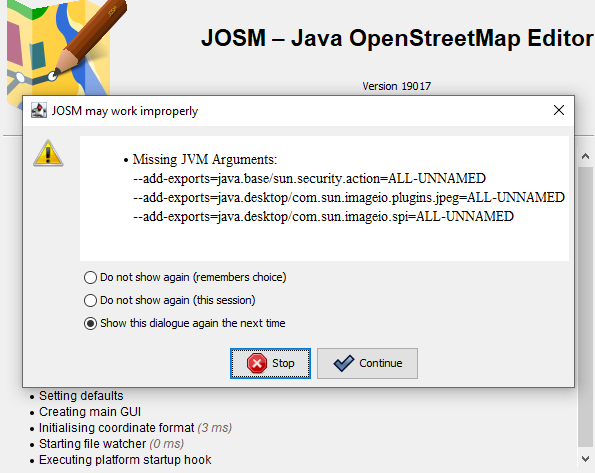
- Upon starting JOSM with v19017 I get a warning message in both Win7 and Win10
- "Missing JVM Arguments:" (can't see how to attach a screenshot)
What is the expected result?
What happens instead?
Please provide any additional information below. Attach a screenshot if possible.
Relative:URL: ^/trunk
Repository:UUID: 0c6e7542-c601-0410-84e7-c038aed88b3b
Last:Changed Date: 2024-03-12 17:31:19 +0100 (Tue, 12 Mar 2024)
Revision:19017
Build-Date:2024-03-13 02:30:59
URL:https://josm.openstreetmap.de/svn/trunk

Identification: JOSM/1.5 (19017 en_GB) Windows 10 64-Bit
OS Build number: Windows 10 Enterprise 2009 (19042)
Memory Usage: 352 MB / 1984 MB (168 MB allocated, but free)
Java version: 17.0.9+8-LTS, Azul Systems, Inc., OpenJDK 64-Bit Server VM
Look and Feel: com.sun.java.swing.plaf.windows.WindowsLookAndFeel
Screen: \Display0 1680×1050 (scaling 1.00×1.00) \Display1 1152×864 (scaling 1.00×1.00)
Maximum Screen Size: 1680×1050
Best cursor sizes: 16×16→32×32, 32×32→32×32
System property file.encoding: Cp1252
System property sun.jnu.encoding: Cp1252
Locale info: en_GB
Numbers with default locale: 1234567890 -> 1234567890

Plugins:
+ buildings_tools (36200)
+ fhrsPlugin (0.2)
+ measurement (36200)

Tagging presets:
+ https://josm.openstreetmap.de/josmfile?page=Presets/Post_box_UK&zip=1

Map paint styles:
+ https://josm.openstreetmap.de/josmfile?page=Styles/Potlatch2&zip=1

Last errors/warnings:
- 00000.812 W: extended font config - overriding 'filename.Myanmar_Text=mmrtext.ttf' with 'MMRTEXT.TTF'
- 00000.814 W: extended font config - overriding 'filename.Mongolian_Baiti=monbaiti.ttf' with 'MONBAITI.TTF'
- 00005.380 W: Unable to request certificate of https://roottest-g3.pkioverheid.nl
- 00007.314 W: Unable to request certificate of https://roottest-g3.pkioverheid.nl
- 00010.837 W: Update plug-ins - You updated your JOSM software. To prevent problems the plug-ins should be updated as well.  Update plug-ins now?
Attachments (1)
Change History (5)
by , 3 years ago
| Attachment: | error_JOSM.png added |
|---|
comment:1 by , 3 years ago
| Description: | modified (diff) |
|---|---|
| Owner: | changed from to |
| Status: | new → needinfo |
comment:2 by , 3 years ago
As I said above:
When starting JOSM with v19017 I get a warning message in both Win7 and Win10, "Missing JVM Arguments:"
same error on two systems, look at the screenshot, that's my problem.
I'm simply reporting a fault that has never occurred before. I don’t understand what it means, I’m just reporting the problem. I’m using an older version of JOSM in the meantime
comment:3 by , 3 years ago
I think on Windows systems this warning is really not needed.
You can select the "Do not show again (remember choice)" option and click on the "Continue" button.
If you want to be sure you can start JOSM with the requested options, e.g. like this in a command window:
java --add-exports=java.base/sun.security.action=ALL-UNNAMED --add-exports=java.desktop/com.sun.imageio.plugins.jpeg=ALL-UNNAMED --add-exports=java.desktop/com.sun.imageio.spi=ALL-UNNAMED -jar josm-tested.jar
comment:4 by , 3 years ago
| Resolution: | → worksforme |
|---|---|
| Status: | needinfo → closed |
The warning tells you that you start josm without the JVM arguments. These aren't needed always, so it probably works without, but better would be to fix your start script (which seems not to be the default or you wouldn't get the warnings).
You didn't get the warnings in the past, because JOSM until now silently ignored missing arguments.


And, what's your problem?