


Modify ↓
Opened 4 years ago
Last modified 4 years ago
#22018 new enhancement
Download Track - Column re-arrangement doesn't arrange the actual rows only the header
| Reported by: | mrgenie | Owned by: | team |
|---|---|---|---|
| Priority: | normal | Milestone: | |
| Component: | Core | Version: | latest |
| Keywords: | Cc: |
Description (last modified by )
First of all I never know which plugin is responsible for what in JOSM - or if it's the core itself.
Also I find a picture says more than a thousand words..
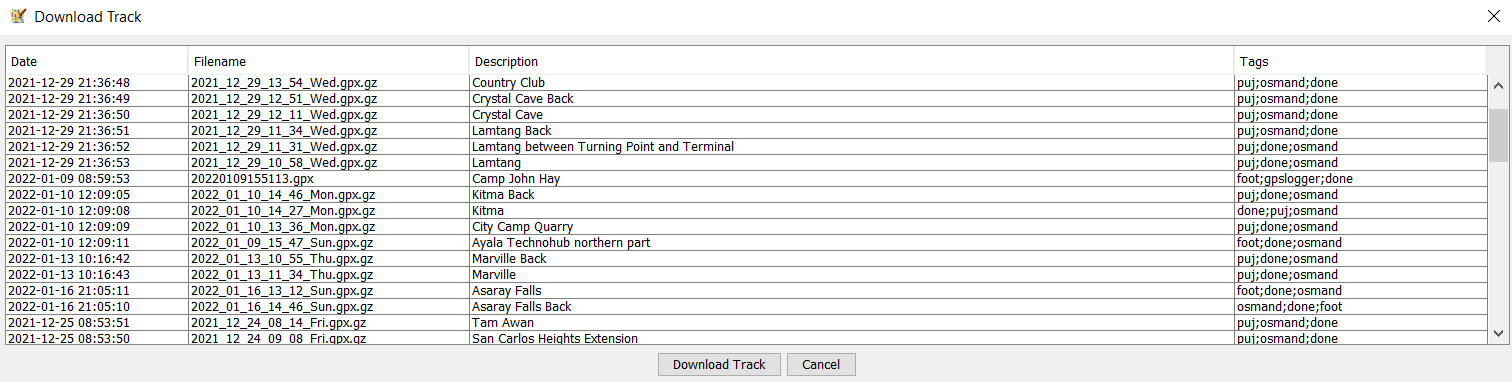
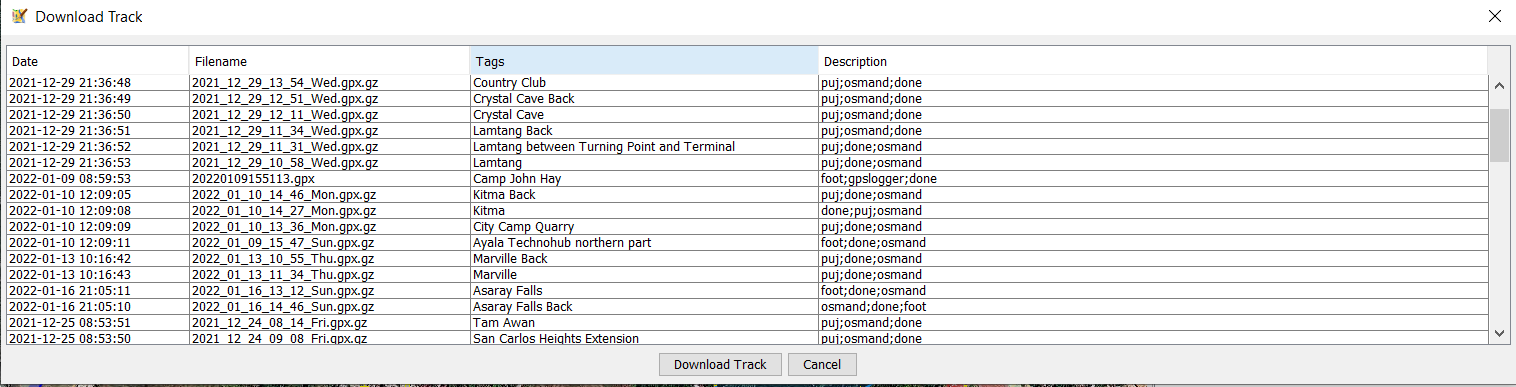
So two pictures showing I dragged the column headers - but the columns themselves don't move accordingly..
Also I don't actually know if this qualifies for a "defect" as it's a mere missing functionality - to be able to re-arrange columns..
So to moderators feel free to properly set type/component or anything else - and feel free to contact me on OSM: Hike&Map
This is the default arrangement

The next picture is when I swap tags and description - the columns don't swap, just the header..
btw this also applies to the other columns

Attachments (2)
Note:
See TracTickets
for help on using tickets.

default column arrangement