Opened 5 years ago
Last modified 4 years ago
#21923 closed enhancement
[Patch] Improve session workflow / Add "save session" — at Initial Version
| Reported by: | Bjoeni | Owned by: | team |
|---|---|---|---|
| Priority: | normal | Milestone: | 22.06 |
| Component: | Core | Version: | tested |
| Keywords: | session gpx conversion | Cc: |
Description
This patch improves the session workflow by allowing the user to keep one session opened and simply saving changes to that session
- Allow saving the current session that was previously saved (1)
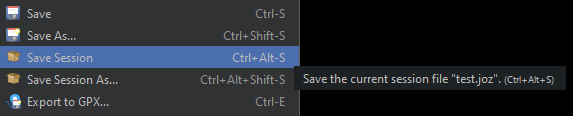
- Add menu "File > Save Session" (2)
- Add shortcuts for "Save Session" and "Save Session As..." menus (3)
- Convert from *.jos to *.joz if necessary
- Warn if a layer will be removed from the session file that was previously saved (4)
- allow easily modifying GPX files by keeping the associated file when converting back and forth between GPX and OSM layers (and also, prevent multiple "Converted from:" in the name)
Notes:
[1]: The dialog allowing the user to select/deselect layers will not be shown in that case. All layers are be saved. The ones with associated files will be referenced, the others will be included in the session file (like the default settings in the "Save Session As..." dialog)
[2]: Personally I think with the new functionality it would make sense to make these menus available in non-expert mode as well. What do you think?
[3]: The default shortcuts are currently as follows:

I think the "Save Session" shortcut makes sense, and the "Save Session As..." shortcut would is only logical when compared to the "Save" vs. "Save As..." shortcuts. However that's a relatively long shortcut, so I can also change or remove that. Opinions?
[4]:

Change History (3)
by , 5 years ago
| Attachment: | 21923.patch added |
|---|
by , 5 years ago
by , 5 years ago
| Attachment: | removed-layer.png added |
|---|