


#21337 closed enhancement (wontfix)
gpx from images doesn't keep the image direction
| Reported by: | StephaneP | Owned by: | StephaneP |
|---|---|---|---|
| Priority: | normal | Milestone: | |
| Component: | Core image mapping | Version: | |
| Keywords: | template_report | Cc: | Don-vip |
Description (last modified by )
What steps will reproduce the problem?
- Load some images with some big changes of direction
- create a gpx from the images sequence
- use this gpx to make an image correlation, with "set image direction enabled"
What is the expected result?
The images should keep the original direction
What happens instead?
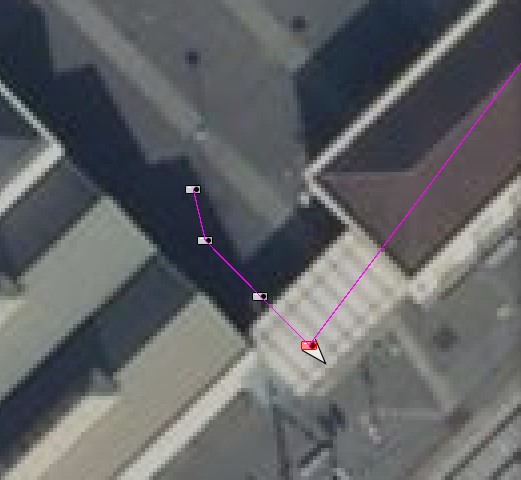
The images are pointing to the next node. In the screenshot bellow, the purple trace is the gpx generated from the image sequence. The fourth image is pointing to east-south, and it's correct. If I correlate the images with the previous gpx, and enable "Set image direction", the image will point to north-east which is wrong.

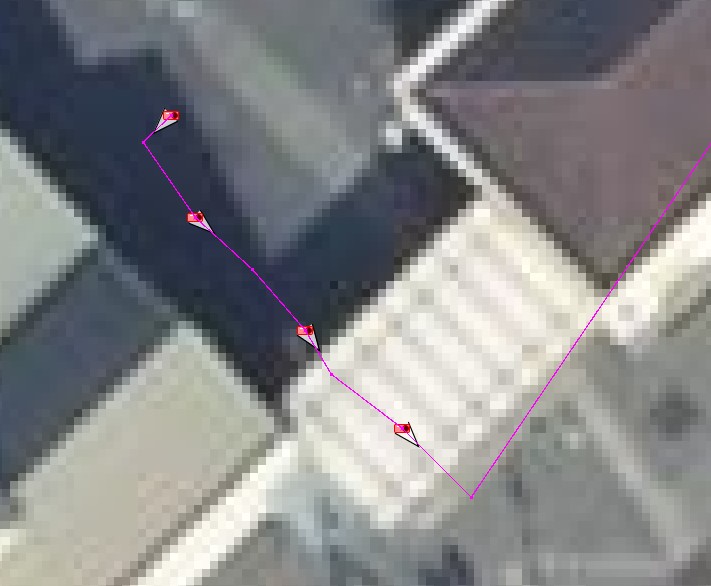
When Josm generate the gpx from the image sequence, it should create a new point/node between the image position and the next one. The image to new node segment should have the same angle as the image direction
Please provide any additional information below. Attach a screenshot if possible.
URL:https://josm.openstreetmap.de/svn/trunk
Repository:UUID: 0c6e7542-c601-0410-84e7-c038aed88b3b
Last:Changed Date: 2021-09-15 00:16:42 +0200 (Wed, 15 Sep 2021)
Build-Date:2021-09-15 01:31:02
Revision:18225
Relative:URL: ^/trunk

Identification: JOSM/1.5 (18225 en) Windows 10 64-Bit
OS Build number: Windows 10 Pro 2009 (19043)
Memory Usage: 1523 MB / 14564 MB (1156 MB allocated, but free)
Java version: 1.8.0_191-b12, Oracle Corporation, Java HotSpot(TM) 64-Bit Server VM
Look and Feel: com.sun.java.swing.plaf.windows.WindowsLookAndFeel
Screen: \Display0 1920×1080 (scaling 1.00×1.00)
Maximum Screen Size: 1920×1080
Best cursor sizes: 16×16→32×32, 32×32→32×32
System property file.encoding: Cp1252
System property sun.jnu.encoding: Cp1252
Locale info: en_FR
Numbers with default locale: 1234567890 -> 1234567890

Plugins:
+ DxfImport (1014)
+ Mapillary (2.0.0-alpha.36-dirty)
+ OpeningHoursEditor (35640)
+ PicLayer (1.0.1)
+ apache-commons (35524)
+ apache-http (35589)
+ areaselector (368)
+ austriaaddresshelper (1597341117)
+ cadastre-fr (35797)
+ continuosDownload (99)
+ contourmerge (v0.1.8)
+ ejml (35458)
+ geotools (35458)
+ jaxb (35543)
+ jna (35662)
+ jts (35458)
+ log4j (35458)
+ measurement (35640)
+ opendata (35803)
+ photo_geotagging (35783)
+ photoadjust (35770)
+ reverter (35732)
+ shrinkwrap (v1.0.4)
+ tageditor (35640)
+ todo (30306)
+ turnlanes-tagging (288)
+ turnrestrictions (35640)
+ undelete (35640)
+ utilsplugin2 (35792)

Tagging presets:
+ %UserProfile%\Documents\Gitlab\preset-josm-collectivites\Presets-collectivités.xml
+ https://josm.openstreetmap.de/josmfile?page=Presets/LaneAttributes&zip=1

Map paint styles:
- https://josm.openstreetmap.de/josmfile?page=Styles/Enhanced_Lane_and_Road_Attributes&zip=1
- https://josm.openstreetmap.de/josmfile?page=Styles/Lane_and_Road_Attributes&zip=1
- https://raw.githubusercontent.com/species/josm-preset-traffic_sign_direction/master/direction.mapcss
+ %UserProfile%\Documents\GitHub\MapCSS-JOSM-Bicycle\cycleway.mapcss
- https://josm.openstreetmap.de/josmfile?page=Styles/iD&zip=1
- https://github.com/bastik/mapcss-tools/raw/osm/mapnik2mapcss/osm-results/mapnik.zip
- https://josm.openstreetmap.de/josmfile?page=Styles/NewHighwayColors&zip=1

Last errors/warnings:
- 17440.083 W: java.net.SocketTimeoutException: Read timed out. Cause: java.net.SocketTimeoutException: Read timed out
- 17440.706 W: java.net.SocketTimeoutException: Read timed out. Cause: java.net.SocketTimeoutException: Read timed out
- 17440.881 W: java.net.SocketTimeoutException: Read timed out. Cause: java.net.SocketTimeoutException: Read timed out
- 17441.222 W: java.net.SocketTimeoutException: Read timed out. Cause: java.net.SocketTimeoutException: Read timed out
- 17446.577 W: java.net.SocketTimeoutException: Read timed out. Cause: java.net.SocketTimeoutException: Read timed out
Attachments (4)
Change History (11)
by , 5 years ago
| Attachment: | gpx_from_image.jpg added |
|---|
comment:1 by , 5 years ago
| Cc: | added |
|---|---|
| Component: | Core → Core image mapping |
| Description: | modified (diff) |
comment:2 by , 5 years ago
| Milestone: | → 21.09 |
|---|---|
| Owner: | changed from to |
| Status: | new → assigned |
comment:3 by , 5 years ago
| Owner: | changed from to |
|---|---|
| Status: | assigned → needinfo |
comment:4 by , 5 years ago
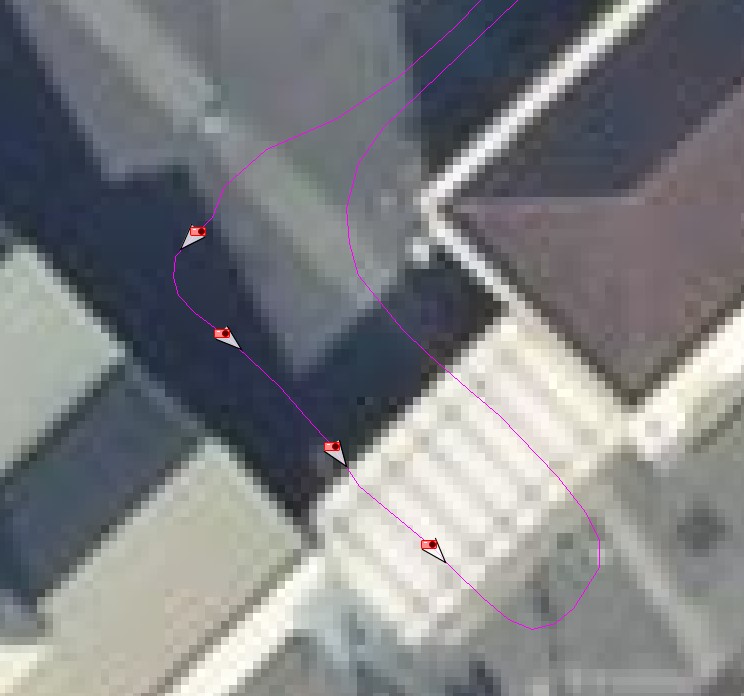
Ok, let's say I have some images, geolocalized with a trace. The direction for each image seems ok :

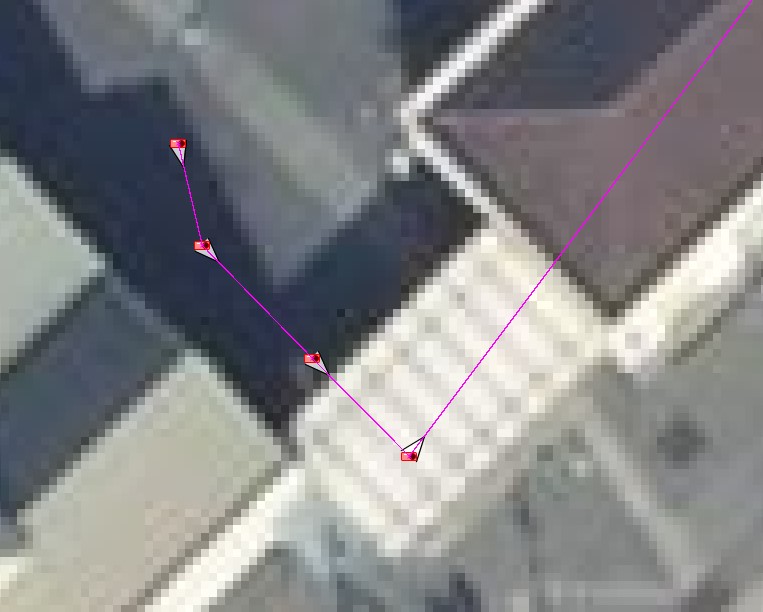
But I need to edit the position/direction for several images. So I create a gpx from the image sequence then import it in Josm to use it as a support layer. I enable "override position" and "set image direction" and then some images don't have a correct direction anymore.

I think that if there is a direction inside the image metadata, Josm should use it when we export the gpx from the image sequence, and create a "virtual" node after the image position and before the next image position, like this :

by , 5 years ago
| Attachment: | original_trace.jpg added |
|---|
by , 5 years ago
| Attachment: | geolocalized on exported trace.jpg added |
|---|
by , 5 years ago
| Attachment: | correct_gpx.jpg added |
|---|
comment:5 by , 5 years ago
| Milestone: | 21.09 |
|---|---|
| Resolution: | → wontfix |
| Status: | needinfo → closed |
OK now I think I understand, but I won't do it:
- it basically implies to perform a correlation during export, which sounds over-complicated
- it makes JOSM mess with the data by adding artificial stuff, it's not what most users would expect (in your case it could make sense, but not necessarily for other users where the image direction cannot be trusted, so it could add false GPX waypoints)
However I still don't understand why you don't use the correct GPX trace you have in the first image instead of converting the images location to a new GPX trace.
comment:6 by , 5 years ago
| Type: | defect → enhancement |
|---|
comment:7 by , 5 years ago
Ok, I understand.
However I still don't understand why you don't use the correct GPX trace you have in the first image instead of converting the images location to a new GPX trace.
Because with the trace I've recorded, I usually have a mix of good and bad geolocalized images. So I start with this "ground trace" then use the support layer to fix the image with the wrong locations. I have to be careful that the correlation with the support layer doesn't reduce the direction accuracy on good images, and add artifical gpx point when it's needed.

I'm sorry but I don't understand your request, could you please share a video of your workflow showing what's wrong?