


Modify ↓
Opened 7 years ago
Closed 7 years ago
#18851 closed defect (invalid)
Image connect error
| Reported by: | Owned by: | team | |
|---|---|---|---|
| Priority: | normal | Milestone: | |
| Component: | Core imagery | Version: | |
| Keywords: | template_report maxar | Cc: |
Description (last modified by )
What steps will reproduce the problem?
- JOSM startup loads vectors but not imagery from any source
- No images
What is the expected result?
What happens instead?
Please provide any additional information below. Attach a screenshot if possible.

URL:https://josm.openstreetmap.de/svn/trunk
Repository:UUID: 0c6e7542-c601-0410-84e7-c038aed88b3b
Last:Changed Date: 2020-01-02 22:34:59 +0100 (Thu, 02 Jan 2020)
Build-Date:2020-01-02 21:52:31
Revision:15628
Relative:URL: ^/trunk

Identification: JOSM/1.5 (15628 en) Windows 10 64-Bit
OS Build number: Windows 10 Enterprise 1909 (18363)
Memory Usage: 247 MB / 989 MB (76 MB allocated, but free)
Java version: 1.8.0_241-b07, Oracle Corporation, Java HotSpot(TM) Client VM
Screen: \Display0 1920x1080, \Display1 1920x1080
Maximum Screen Size: 1920x1080
Dataset consistency test: No problems found

Tagging presets:
+ https://josm.openstreetmap.de/josmfile?page=Presets/BuildingPreset&zip=1

Last errors/warnings:
- W: No configuration settings found.  Using hardcoded default values for all pools.
- W: Region [WMS_BLOCK_v2] Resetting cache
- W: Region [WMTS_BLOCK_v2] Resetting cache
Attachments (1)
Change History (3)
by , 7 years ago
| Attachment: | JOSM_ERROR.jpg added |
|---|
comment:1 by , 7 years ago
| Component: | Core → Core imagery |
|---|---|
| Description: | modified (diff) |
comment:2 by , 7 years ago
| Keywords: | maxar added |
|---|---|
| Resolution: | → invalid |
| Status: | new → closed |
Please update JOSM.
Note:
See TracTickets
for help on using tickets.

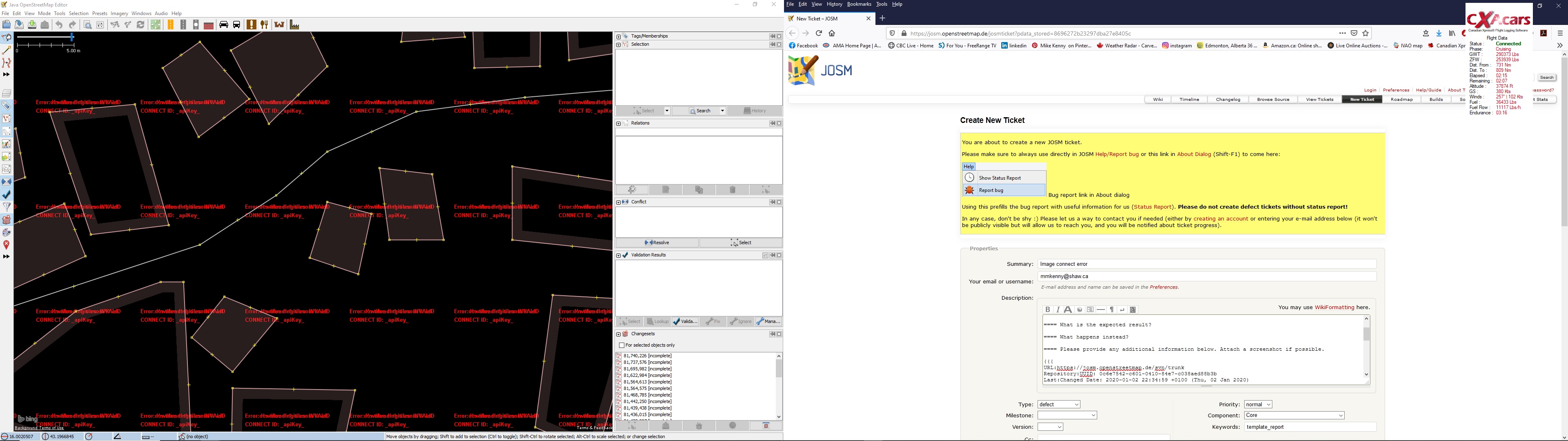
Screen shot of problem