Opened 8 years ago
Last modified 7 years ago
#17237 closed enhancement
Save/Save As: Poor error handling with write protected files — at Initial Version
| Reported by: | GerdP | Owned by: | team |
|---|---|---|---|
| Priority: | normal | Milestone: | 19.04 |
| Component: | Core | Version: | |
| Keywords: | template_report | Cc: |
Description
What steps will reproduce the problem?
- Open a write protected osm file
- Click Save
What is the expected result?
A single error message in a popup telling me that the file is write protected.
What happens instead?
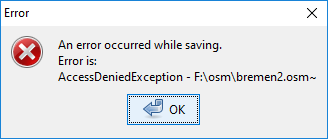
Two popups:
1st says that the backup can't be saved
2nd says that the file can't be saved
Please provide any additional information below. Attach a screenshot if possible.
Similar problem when you select a write protected file in Save As.
Build-Date:2019-01-24 09:50:51
Revision:14726
Is-Local-Build:true

Identification: JOSM/1.5 (14726 SVN en) Windows 10 64-Bit
OS Build number: Windows 10 Home 1803 (17134)
Memory Usage: 540 MB / 1753 MB (284 MB allocated, but free)
Java version: 1.8.0_191-b12, Oracle Corporation, Java HotSpot(TM) 64-Bit Server VM
Screen: \Display0 1920x1080
Maximum Screen Size: 1920x1080
VM arguments: [-agentlib:jdwp=transport=dt_socket,suspend=y,address=localhost:57267, -ea, -Dfile.encoding=UTF-8]
Program arguments: [--debug]

Plugins:
+ OpeningHoursEditor (34535)
+ apache-commons (34506)
+ buildings_tools (34850)
+ download_along (34838)
+ ejml (34389)
+ geotools (34513)
+ jaxb (34506)
+ jts (34524)
+ o5m (34846)
+ opendata (34805)
+ pbf (34858)
+ poly (34546)
+ reltoolbox (34788)
+ reverter (34552)
+ utilsplugin2 (34844)

Tagging presets:
+ https://raw.githubusercontent.com/OpenNauticalChart/josm/master/INT-1-preset.xml
+ https://josm.openstreetmap.de/josmfile?page=Presets/Historical_Objects&zip=1

Last errors/warnings:
- W: No configuration settings found.  Using hardcoded default values for all pools.
- E: org.openstreetmap.josm.io.IllegalDataException: crosby.binary.file.FileFormatException: Unexpectedly long header 65536 bytes. Possibly corrupt file.. Cause: crosby.binary.file.FileFormatException: Unexpectedly long header 65536 bytes. Possibly corrupt file.
- E: Error - <html>Could not read file 'sample.osm.pbf'.<br>Error is:<br>crosby.binary.file.FileFormatException: Unexpectedly long header 65536 bytes. Possibly corrupt file.</html>
- E: org.openstreetmap.josm.io.IllegalDataException: crosby.binary.file.FileFormatException: Unexpectedly long header 65536 bytes. Possibly corrupt file.. Cause: crosby.binary.file.FileFormatException: Unexpectedly long header 65536 bytes. Possibly corrupt file.
- E: Error - <html>Could not read file 'sample.osm.pbf'.<br>Error is:<br>crosby.binary.file.FileFormatException: Unexpectedly long header 65536 bytes. Possibly corrupt file.</html>
Change History (2)
by , 8 years ago
| Attachment: | popup1.PNG added |
|---|
by , 8 years ago
| Attachment: | popup2.PNG added |
|---|
Note:
See TracTickets
for help on using tickets.