


Opened 8 years ago
Last modified 6 years ago
#17048 closed task
On my new laptop under Windows 10, text in JOSM is very small, and overlaps — at Initial Version
| Reported by: | Owned by: | team | |
|---|---|---|---|
| Priority: | normal | Milestone: | |
| Component: | Core | Version: | latest |
| Keywords: | windows hidpi gsoc-candidate | Cc: | gpermant |
Description
What steps will reproduce the problem?
Opening JOSM on my new laptop, with Win 10 and 3840x2160 resolution
What is the expected result?
Legible text in all parts of JOSM
What happens instead?
Text is very small, hardly legible.
In Lists and trees, text overlaps.
Please provide any additional information below. Attach a screenshot if possible.
URL:https://josm.openstreetmap.de/svn/trunk
Repository:UUID: 0c6e7542-c601-0410-84e7-c038aed88b3b
Last:Changed Date: 2018-11-28 01:09:01 +0100 (Wed, 28 Nov 2018)
Build-Date:2018-11-28 00:26:41
Revision:14460
Relative:URL: ^/trunk

Identification: JOSM/1.5 (14460 de) Windows 10 64-Bit
OS Build number: Windows 10 Pro 1803 (17134)
Memory Usage: 628 MB / 1820 MB (202 MB allocated, but free)
Java version: 1.8.0_191-b12, Oracle Corporation, Java HotSpot(TM) 64-Bit Server VM
Screen: \Display0 3840x2160
Maximum Screen Size: 3840x2160
Dataset consistency test: No problems found

Plugins:
+ imagery_offset_db (34641)
+ turnrestrictions (34643)

Last errors/warnings:
- W: Erweiterungen aktualisieren - org.openstreetmap.josm.plugins.PluginHandler$UpdatePluginsMessagePanel[,0,0,0x0,invalid,layout=java.awt.GridBagLayout,alignmentX=0.0,alignmentY=0.0,border=,flags=9,maximumSize=,minimumSize=,preferredSize=]
- W: No configuration settings found.  Using hardcoded default values for all pools.
Note:
See TracTickets
for help on using tickets.


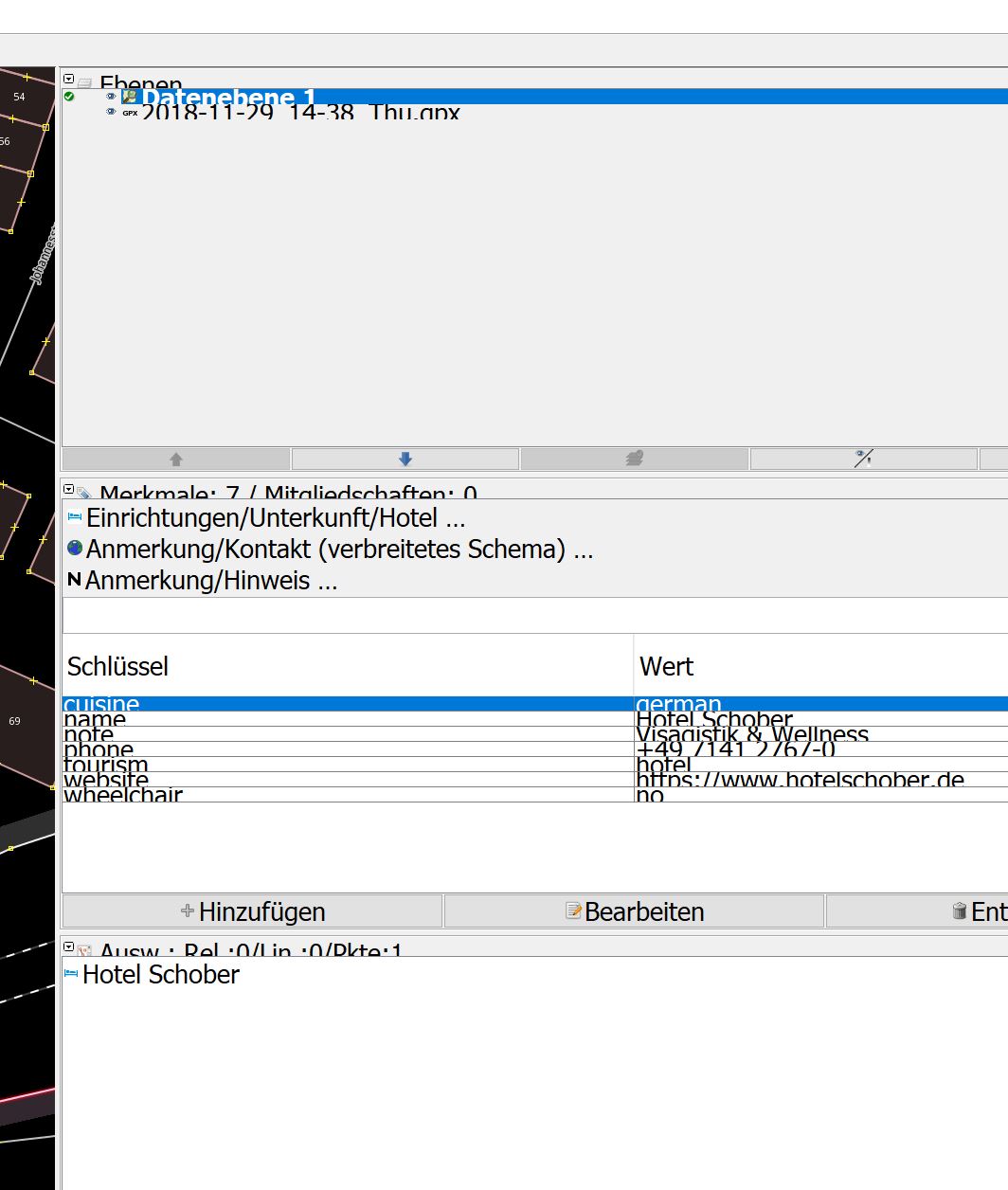
Screenshot of overlapping, non-legible text in JOSM