


Opened 11 years ago
Closed 7 years ago
#12724 closed defect (duplicate)
Keyboard shortcuts: Alt-number acts on layers in reverse order
| Reported by: | anonymous | Owned by: | team |
|---|---|---|---|
| Priority: | normal | Milestone: | |
| Component: | Core shortcuts | Version: | |
| Keywords: | Cc: |
Description (last modified by )
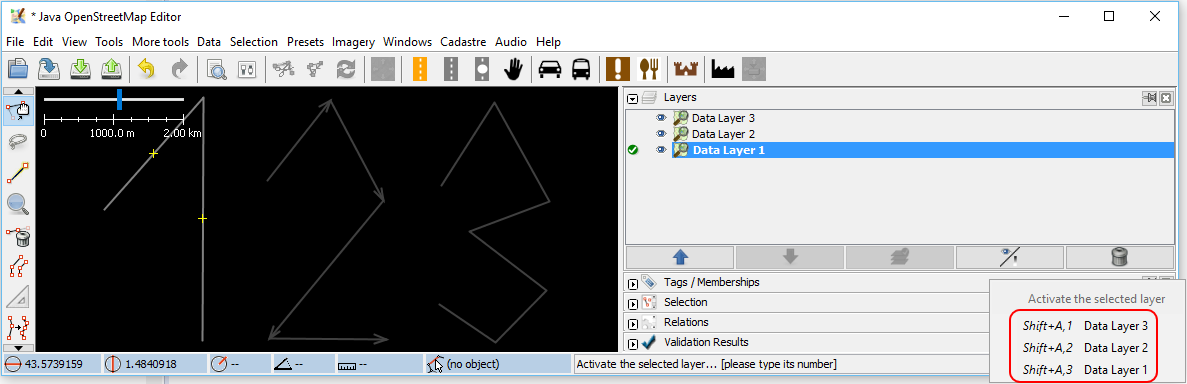
Hi. I'm using JOSM 9979 from Debian without any keyboard configuration changes. The "Keyboard shortcuts" says that Alt+1 is "Toggle visibility of layer: 1", Alt+2 is for layer 2 and so on. If the Layers window shows layers
AAA
BBB
CCC
then I observe Alt+1 affecting CCC, Alt+2 affecting BBB and Alt+3 affecting AAA, which is the opposite of how I expect it to work. Note that I can activate layers the way one would expect: Shift-A 1 activates AAA and so on. Thanks.
Build-Name:Debian
Build-Date:2016-03-13 18:06:27
Revision:9979
Is-Local-Build:false
Debian-Release:0.0.svn9979+dfsg-1

Identification: JOSM/1.5 (9979 Debian en) Linux Debian GNU/Linux 8.0 (jessie)
Memory Usage: 324 MB / 864 MB (192 MB allocated, but free)
Java version: 1.8.0_77-Debian-8u77-b03-3-b03, Oracle Corporation, OpenJDK 64-Bit Server VM
VM arguments: [-Djosm.restart=true, -Djava.net.useSystemProxies=true]

Plugins:
- Create_grid_of_ways (31772)
- apache-commons (31895)
- conflation (0.1.9)
- contourmerge (1014)
- dataimport (31772)
- ejml (31895)
- geotools (31895)
- jts (31772)
- log4j (31895)
- measurement (31895)
- merge-overlap (31967)
- opendata (32139)
- reverter (32005)
- undelete (31895)
- utilsplugin2 (32099)

Last errors/warnings:
- W:  Enforcement: Could not get presets icon vehicle/restriction/speed_camera.svg
- E: Failed to locate image 'nautical/waterway_river.svg'
- W:  Waterway: Could not get presets icon nautical/waterway_river.svg
- E: Failed to locate image 'transport/bridge/bridge.svg'
- W:  Bridge: Could not get presets icon transport/bridge/bridge.svg
EDIT: Reproduced on Windows:

Attachments (2)
Change History (11)
comment:1 by , 11 years ago
| Owner: | changed from to |
|---|---|
| Status: | new → needinfo |
by , 11 years ago
| Attachment: | josm.status added |
|---|
comment:3 by , 11 years ago
| Description: | modified (diff) |
|---|---|
| Owner: | changed from to |
| Status: | needinfo → new |
by , 11 years ago
comment:4 by , 11 years ago
| Description: | modified (diff) |
|---|
comment:5 by , 10 years ago
I would stick with the current behaviour:
- Since imagery layers are added at the bottom of the layer list, pressing
ALT+1toggles the lowest imagery layer – independent of the number of data layers. - Relating to the screenshot in the description, "Data Layer 2" is added on top of "Data Layer 1". Thus, pressing
ALT+1toggles "Data Layer 1".
comment:6 by , 10 years ago
Two comments:
- I almost never have multiple data layers. The layers are always of different types, and the UI should be manipulating them in the order they appear
- If you really think that this is the proper behavior, then the layer-activation keys (Shift-A number) should then be changed.
comment:7 by , 10 years ago
I prefer to have it simple and while I understand the current behaviour, I still think it would be nicer to start counting at the same spot and not like it is atm start counting data layers from top on and imagery layers from the bottom on. This is confusing.
comment:8 by , 7 years ago
Is this still a problem since the layer shortcuts are shown in square brackets (but only in expert mode)?
comment:9 by , 7 years ago
| Resolution: | → duplicate |
|---|---|
| Status: | new → closed |
Closed as duplicate of #17221.
For me, no longer a problem.

Can you please attach your status report as per newticket? Thanks.