


Opened 11 years ago
Last modified 11 years ago
#11331 closed defect
Generating jar file for tests with Java Web Start — at Version 1
| Reported by: | wiktorn | Owned by: | team |
|---|---|---|---|
| Priority: | normal | Milestone: | |
| Component: | Core Webstart | Version: | |
| Keywords: | Cc: | bastiK |
Description (last modified by )
To debug #11298 I'd like to check, how JOSM behaves when started by Java Web Start:
- I create josm-custom.jar using ant dist
- I put jnlp (attached) and jar file in c:\josm
- When I start jnlp, I get following exception
com.sun.deploy.net.JARSigningException: Found unsigned entry in resource: file:/c|/josm/josm-custom.jar
- So I try to sign the jar. Fist I generate the key for signature (with a little help from http://docs.oracle.com/cd/E19798-01/821-1751/ghlgv/index.html):
"c:\Program Files\Java\jdk1.7.0_76\bin\keytool.exe" -genkey -alias signature -keyalg RSA -keystore josm.jks
- Then I sign the jar using the command:
{{{"c:\Program Files\Java\jdk1.7.0_76\bin\jarsigner.exe" -keystore josm.jks -verbose josm-custom.jar signature
(...)
jar signed.
Warning:
The signer certificate will expire within six months.
No -tsa or -tsacert is provided and this jar is not timestamped. Without a timestamp, users may not be able to validate this jar after the signer certificate's expiration date (2015-07-09) or after any future revocation date.}}}
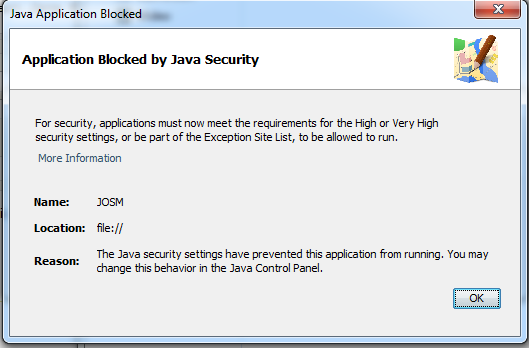
- I start Java Web Start again, and then I get "Application blocked by Java Security"

Change History (3)
by , 11 years ago
by , 11 years ago
| Attachment: | apllication blocked.png added |
|---|
comment:1 by , 11 years ago
| Description: | modified (diff) |
|---|
Note:
See TracTickets
for help on using tickets.

JNLP file