


#5451 closed enhancement (fixed)
PicLayer calibration - GE .kml file support
| Reported by: | Owned by: | Larry0ua | |
|---|---|---|---|
| Priority: | normal | Milestone: | |
| Component: | Plugin piclayer | Version: | latest |
| Keywords: | Cc: |
Description (last modified by )
I have many images held in KML format as overlays. It would be helpful to store the PicLayer calibration information in a KML file. That would mean I could cut and paste KML data into the calibration file and the calibration would be ready to go. Likewise something calibrated in JOSM could be looked at in Google Earth.
See the two example files attached. They are the KML for and the cal file for, the same image (not supplied). They place the image in roughly the same location in GE and JOSM.
Attachments (3)
Change History (20)
comment:2 by , 16 years ago
Solving the captcha and logging in would have helped for you file. Or you can add it as zip archive.
comment:3 by , 15 years ago
| Description: | modified (diff) |
|---|---|
| Owner: | changed from to |
| Status: | new → assigned |
| Summary: | Calibration file as kml to allow calibration by cut and paste → PicLayer calibration - GE .kml file support |
comment:4 by , 15 years ago
@Larry0ua:
I understand the reference like this:
- first move the image into the given bounding box
- then rotate counterclockwise by the given angle about the center of the image
Could be done by the following algorithm:
- convert lat/lon box to east/north box
[x1,y1,x2,y2] - build affine transformation:
- scale by ((x2-x1)/w, (y2-y1)/h)
(w - image width in px, h - image height) - rotate
- move by east/north value of center point (x1+(x2-x1)/2, y1+(y2-y1)/2)
- scale by ((x2-x1)/w, (y2-y1)/h)
As a first step, there should be a movement by (-w/2, -h/2), but I think this is already implied in the piclayer algorithm:
g.drawImage( image, -image.getWidth(null) / 2, -image.getHeight(null) / 2, null );
comment:5 by , 15 years ago
| Resolution: | → fixed |
|---|---|
| Status: | assigned → closed |
Now KML is supported for PicLayer and ready for testing. Please post any unsupported or badly calibrated KMLs here. [o27231]
In supported I mean:
[+] opening KML with LatLonBox is OK
[+] multiimage KML is supported
[-] saving is not implemented (I see gx:LatLonQuad as something to work on, but may be later - have no idea about how to read such because that is not affine in general - I can convert to, but cannot convert from).
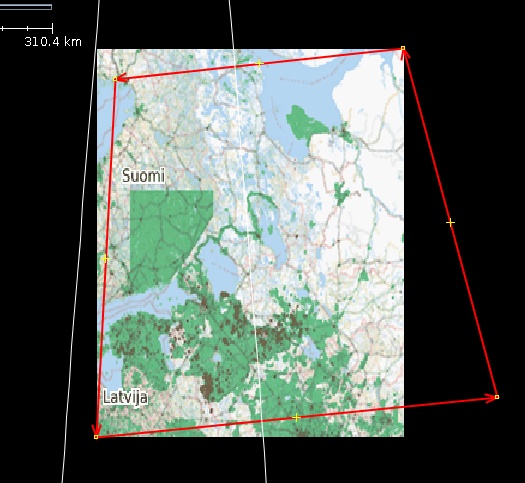
by , 15 years ago
| Attachment: | piclayer-proj.png added |
|---|
comment:6 by , 15 years ago
There are problems with large images in projections other than Mercator and WGS84.

I noticed, that google earth would really reproject the image (to fit the red quadrilateral) and even make the upper and lower edges curved (to follow the line of constant latitude).
We should seriously look for a library that can do more than affine transformation. One candidate would be GeoTools.
comment:9 by , 15 years ago
rotation - fixed.
kmz - hope to have it in the future, as using it too, and it does not look harder than kml (just zip with kml and images inside)
about reporjection... really not easy stuff, needs investigation
comment:10 by , 15 years ago
Regarding KMZ: See e.g. trunk/src/org/openstreetmap/josm/io/OsmGzipImporter.java.
comment:11 by , 15 years ago
Ooops Zip, then see trunk/src/org/openstreetmap/josm/gui/tagging/TaggingPreset.java, which also supports Zip-File including images.
comment:12 by , 15 years ago
@stoecker, actually there is support of zip in PicLayer so it will be not a problem :)
comment:13 by , 15 years ago
Zip itself is no problem, true. But the core has already a "get the image for me and don't bother me with the real place" functionality including zip support.
comment:14 by , 15 years ago
If i could load kml or kmz with picture inside it would be perfect :)
And dynamic kml like these
<?xml version="1.0" encoding="utf-8"?> <kml xmlns:atom="http://www.w3.org/2005/Atom" xmlns="http://www.opengis.net/kml/2.2"> <NetworkLink> <open>1</open> <name>Demographics/ESRI_Population_World</name> <LookAt> <longitude>-1.47523492544022</longitude> <latitude>11.8018794035218</latitude> <range>28241154.7596751</range> </LookAt> <Region> <LatLonAltBox> <north>90</north> <south>-90</south> <east>180</east> <west>-180</west> </LatLonAltBox> <Lod> <minLodPixels>128</minLodPixels> <maxLodPixels>-1</maxLodPixels> </Lod> </Region> <Url> <viewRefreshMode>onStop</viewRefreshMode> <viewRefreshTime>2</viewRefreshTime> <href>http://sampleserver1.arcgisonline.com/ArcGIS/rest/services/Demographics/ESRI_Population_World/MapServer/export</href> <viewFormat>f=kmz&bboxSR=4326&imageSR=4326&transparent=true&bbox=[bboxWest],[bboxSouth],[bboxEast],[bboxNorth]&size=[horizPixels],[vertPixels]&</viewFormat> </Url> </NetworkLink> </kml>
follow-up: 16 comment:15 by , 15 years ago
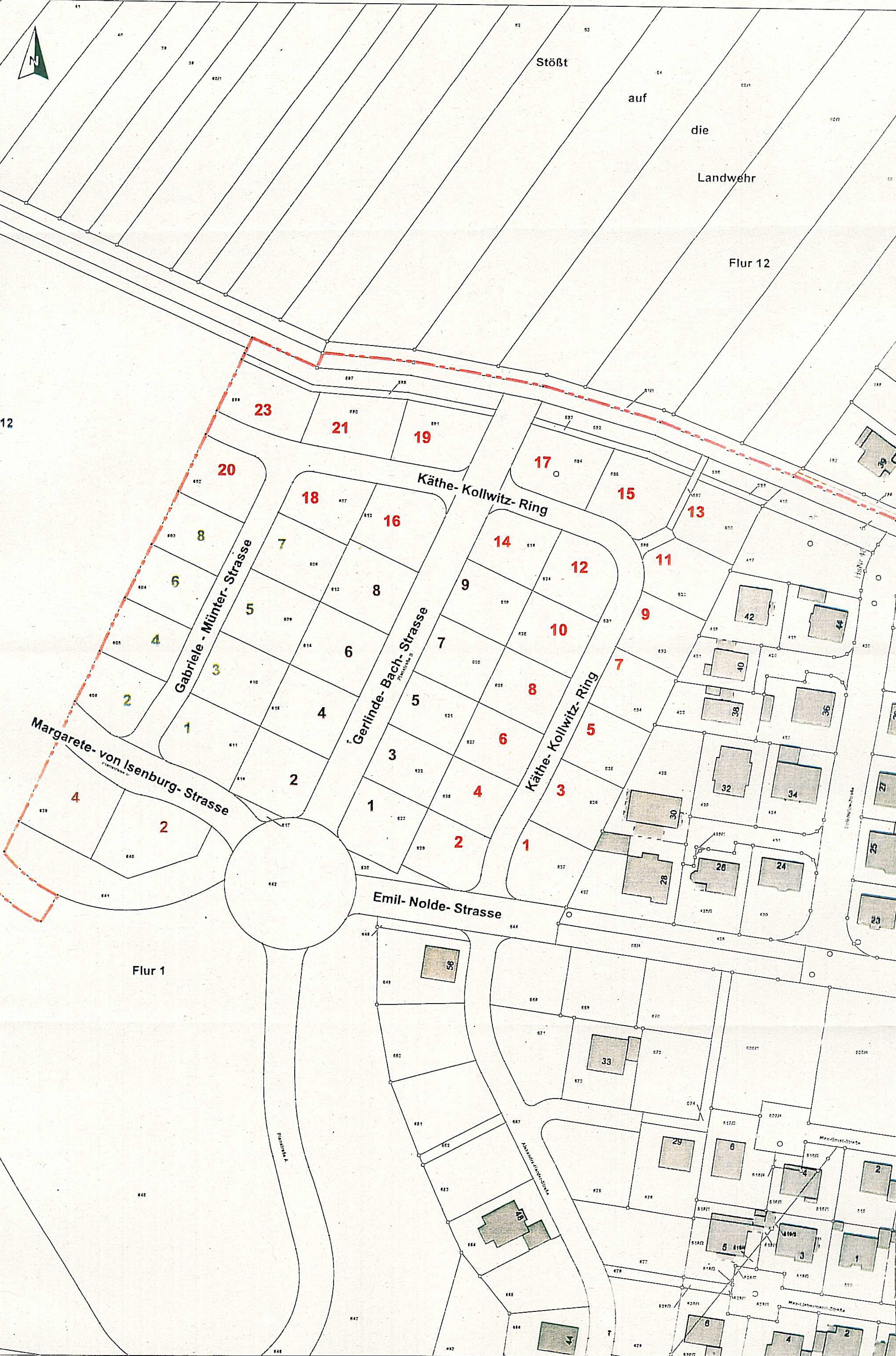
regarding Nidderau Bauabschnitt 4 / allee-sued-ba4-2_crop:
I received a map from city government for a new residential aerea in our city. In Google Earth I put in in the right place and dimension. From the kmz-file I extracted the kml and changed the path (cancel "/file/").
In JOSM using piclayer the import worked but the map was shown bigger than it should be, I would say 3 times.
I's a pitty that this useful function doesn't work.
Thomas
comment:16 by , 15 years ago
Replying to thrap:
regarding Nidderau Bauabschnitt 4 / allee-sued-ba4-2_crop:
I received a map from city government for a new residential aerea in our city. In Google Earth I put in in the right place and dimension. From the kmz-file I extracted the kml and changed the path (cancel "/file/").
In JOSM using piclayer the import worked but the map was shown bigger than it should be, I would say 3 times.
I's a pitty that this useful function doesn't work.
Thomas
I found out the right way to change the dimension of the map. Everything fine! wonderful tool.
Thomas


TRAC says my files are SPAM, so sorry I could not upload them. Here they are: cal then kml