Search:
Login
Preferences
Help/Guide
About Trac
Register
Forgot your password?
Wiki
Timeline
Changelog
Browse Source
View Tickets
New Ticket
Roadmap
Builds
Sonar
Search
Context Navigation
-1
Start Page
Index
History
Editing Ru:Help
Adjust edit area height:
8
12
16
20
24
28
32
36
40
Edit side-by-side
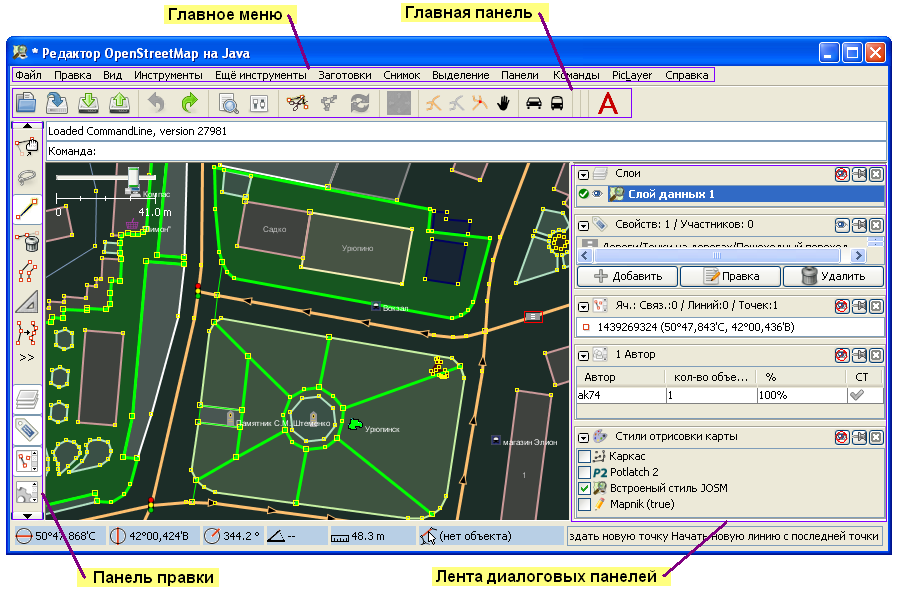
[[TranslatedPages]] = Добро пожаловать в справочную онлайн систему JOSM = You can improve this help by clicking on "Open in Browser" below. If you have reached this page from pressing F1 in JOSM, then you can get more specific help on a particular window, dialog, or tool, if you have the mouse cursor over that item prior to pressing F1. ''' Beware: This help might get outdated from time to time! Please help improving it by fixing parts that are missing or outdated - this is a wiki! ''' == Table of Contents == === Getting Started === * [wiki:Introduction Introduction to JOSM] * [wiki:HowTo How Tos] about JOSM * [wiki:Relations Working with Relations] * [wiki:Help/HowTo/AudioMapping Audio mapping:] playing voice notes and synchronizing them with your GPS tracks in JOSM * [http://wiki.openstreetmap.org/index.php/FAQ FAQ about OSM in general] * [wiki:Shortcuts Keyboard shortcuts] === JOSM interface === * Main Menu (''note: depending on which [wiki:Help/Preferences/Plugins plugins] you have installed you may have more options on this menu'') * [wiki:Help/Menu/File File] * [wiki:Help/Menu/Edit Edit] * [wiki:Help/Menu/View View] * [wiki:Help/Menu/Tools Tools] * [wiki:Help/Menu/Audio Audio] * [wiki:Help/Menu/Presets Presets] * [wiki:Help/Menu/WMS WMS] ''(shown when wmsplugin plugin is installed)'' * [wiki:Help/Menu/Help Help] * Main Toolbar (the toolbar above the main JOSM window). This toolbar is highly customisable, with the ability to add and remove menus items from the [wiki:Help/Action/Preferences preferences] dialog. * [wiki:Help/Action/Open Open] * [wiki:Help/Action/Save Save] * [wiki:Help/Action/GpxExport GPX] * [wiki:Help/Action/Download Download from OSM] * [wiki:Help/Action/Upload Upload to OSM] * [wiki:Help/Action/Undo Undo] * [wiki:Help/Action/Redo Redo] * [wiki:Help/Action/Preferences Preferences] * Edit Toolbar (the toolbar down the left hand side of the main JOSM window) * [wiki:Help/Action/Zoom Zoom] * [wiki:Help/Action/Move/Move Select Move Rotate] * [wiki:Help/Action/Draw Draw Nodes] * [wiki:Help/Action/Delete Delete] * [wiki:Help/Action/CreateAreas Create Areas By Extrusion] buttons below the delete tool affect the display of dialog windows described under 'views' below * Views * [wiki:Help/MapView Map View] * [wiki:Help/Dialog/LayerList Layer List Dialog] * [wiki:Help/Dialog/Properties Properties/Memberships Dialog] * [wiki:Help/Dialog/History History Dialog] * [wiki:Help/Dialog/SelectionList Current Selection Dialog] * [wiki:Help/Dialog/UserList Authors Dialog] * [wiki:Help/Dialog/Conflict Conflict Dialog] * [wiki:Help/Dialog/CommandStack Command Stack Dialog] * [wiki:Help/Dialog/RelationList Relations List Dialog] * ''(... other buttons depending on the Plugins loaded)'' === JOSM Plugins === Information and Documentation about various JOSM plugins can be found here: [http://wiki.openstreetmap.org/index.php/JOSM/Plugins] === JOSM Preferences === You can set your [wiki:Help/Action/Preferences preferences] for display and other options. === JOSM error messages === * [wiki:Help/ErrorMsg/ErrorParsing Error while parsing]
Note:
See
WikiFormatting
and
TracWiki
for help on editing wiki content.
Change information
Your email or username:
E-mail address and name can be saved in the
Preferences
Comment about this change (optional):
Attachments
(1)
josm-screen-commended-ru.PNG
(
130.5 KB
) - added by
ak74
14 years ago
.
Download all attachments as:
.zip
Note:
See
TracWiki
for help on using the wiki.