Search:
Login
Preferences
Help/Guide
About Trac
Register
Forgot your password?
Wiki
Timeline
Changelog
Browse Source
View Tickets
New Ticket
Roadmap
Builds
Sonar
Search
Context Navigation
+0
Start Page
Index
History
Editing Help/Action/ImageryAdjust
Adjust edit area height:
8
12
16
20
24
28
32
36
40
Edit side-by-side
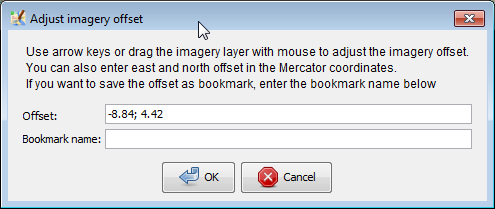
[[TranslatedPages]] Accessible from: 1. [wikitr:/Help/Menu/Imagery "Imagery" menu] as "New offset" item. 2. [wikitr:/Help/Menu/ImageryContextMenu in context menu of "Imagery layer"] User is prompted to enter two real (R) numbers separated by semicolon and a name of offset. Further instructions displayed directly in the dialogue. [[Image(imagery prompt.png,link=)]] === See also === * [osmwiki:JOSM/Plugins/Imagery_Offset_Database Imagery Offset Database plugin] - a [osmwiki:Imagery_Offset_Database collaborative database] with imagery offsets for variety of imagery sources. You could re-use existing offsets instead of guessing right numbers by inaccurate GPS traces * [osmwiki:Using_Imagery] - how to use imagery that is offset from a real position ---- Back to [wikitr:/Help Main Help]
Note:
See
WikiFormatting
and
TracWiki
for help on editing wiki content.
Change information
Your email or username:
E-mail address and name can be saved in the
Preferences
Comment about this change (optional):
Attachments
(1)
imagery prompt.png
(
13.4 KB
) - added by
openstreetmap.org-user-d1g
10 years ago
.
Download all attachments as:
.zip
Note:
See
TracWiki
for help on using the wiki.