Search:
Login
Preferences
Help/Guide
About Trac
Register
Forgot your password?
Wiki
Timeline
Changelog
Browse Source
View Tickets
New Ticket
Roadmap
Builds
Sonar
Search
Context Navigation
+0
Start Page
Index
History
Editing Help/Action/DownloadAlongWay
Adjust edit area height:
8
12
16
20
24
28
32
36
40
Edit side-by-side
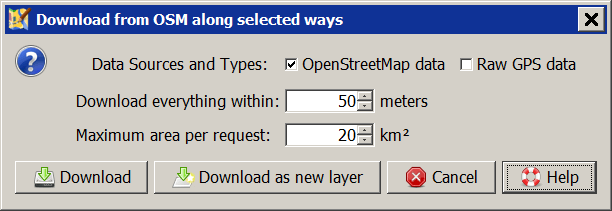
[[TranslatedPages]] = File > Download along = [[JOSMImage(download_along_way,middle,link=,margin-right=20,48)]] ''Keyboard shortcut:'' **`Alt+Shift+D`** **Download from OSM along selected ways** This action will download data inside a certain corridor along the Selection. Data Sources and Types:: Available are ''OpenStreetMap data'' ([wikitr:/Help/Concepts/Object objects], no nodes) and ''Raw GPS data'' from GPX tracks. Source of the data is an [wikitr:/Help/Preferences/Connection OSM API] server. Download everything within:: Sets the width of the corridor in which the presence of the data is guaranteed. It is valid to both sides of the [wikitr:/Help/Dialog/SelectionList#Selection selected] way. The default value of 50 m will give a corridor width of 100 m. Maximum area per request:: This size affects the amount of objects being downloaded outside of the corridor. The heading of the selected ways has effects on this amount too. The default of 20 km² may result that all objects up to a distance of ~2,100 meters are downloaded. [[Image(Help/Action/DownloadAlongWay:scrDownloadAlongWayAction.png,link=,margin-left=15,margin-right=10)]] == See also == * [[JOSMImage(download,middle,link=)]] [wikitr:/Help/Action/Download Download data] * [[JOSMImage(download_in_view,middle,link=)]] [wikitr:/Help/Action/DownloadOsmInView Download in current view] * [[JOSMImage(downloadalongtrack,middle,link=)]] [wikitr:/Help/Menu/GPXLayer Download along a GPX track] * [[Image(https://raw.githubusercontent.com/JOSM/continuos-download/master/images/continuous-download.png,middle,link=)]] [osmwiki:JOSM/Plugins/continuosDownload continuosDownload Plugin] ---- Back to [wikitr:/Help/Menu/File File menu][[Br]] Back to [wikitr:/Help/Menu Main menu][[Br]] Back to [wikitr:/Help Main help]
Note:
See
WikiFormatting
and
TracWiki
for help on editing wiki content.
Change information
Your email or username:
E-mail address and name can be saved in the
Preferences
Comment about this change (optional):
Attachments
(1)
scrDownloadAlongWayAction.png
(
8.8 KB
) - added by
Hb---
6 years ago
.
Download all attachments as:
.zip
Note:
See
TracWiki
for help on using the wiki.