Search:
Login
Preferences
Help/Guide
About Trac
Register
Forgot your password?
Wiki
Timeline
Changelog
Browse Source
View Tickets
New Ticket
Roadmap
Builds
Sonar
Search
Context Navigation
+0
Start Page
Index
History
Editing Help/Action/Delete
Adjust edit area height:
8
12
16
20
24
28
32
36
40
Edit side-by-side
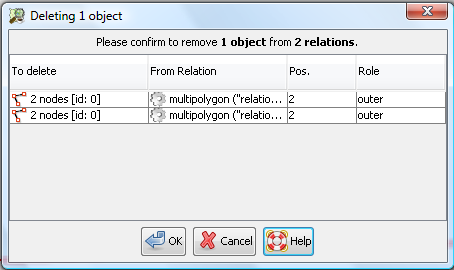
[[TranslatedPages]] = Delete mode = [[Image(source:trunk/images/mapmode/delete.png,bottom)]] ''Shortcut key:'' **`Ctrl+Delete`** Delete nodes, segments, ways and relations by a single mouse click. All possibly affected objects are highlighted in the Map View. == Usage == 0. Clear the Selection by **`[Esc]`** or [[Image(source:/trunk/images/unselectall.svg,middle)]] [wikitr:/Help/Action/UnselectAll Unselect All].\\ Otherwise the Selection and **all referring objects** to it get deleted by entering this mode.\\ 1. Enter the Delete mode by shortcut key or via the [wikitr:/Help/EditToolbar#Workingmode Edit toolbar].\\ The cursor changes. 1. Click on nodes, way segments and ways to delete them. === Modifiers * `Shift` to remove only a way segment.\\ The remaining parts os the way are split apart. * `Alt` to spare the nodes of a way. \\ These nodes will remain even when they are unused. * `Ctrl` to additionally delete all [wikitr:/Help/Concepts/Object objects] which reference the selected object **without further warning**, relations included. The definition of ''reference'' is: * a node references all ways it is connected to * an object references all relations it is member of * a simple way which is not a member of a relation has no references. ⏩ The cursor changes according to the affected objects. {{{#!comment the anchor is a help topic }}} === Deleting objects being members of relations === #DeleteFromRelations If you delete an [wikitr:/Help/Concepts/Object object] which is part of a [wikitr:/Help/Concepts/Object#Relations relation] the object has to be removed from the relation. JOSM doesn't silently do so. Rather, the following confirmation dialog is displayed: [[Image(confirm-delete-from-relations.png)]] The entries in the displayed list indicate from which relations (second column in the table) the object (or the objects, if you delete more than one object) have to be removed. Click '''Cancel''' if you don't want to remove the objects from these relations. In this case, JOSM doesn't delete the objects either, the operation is aborted. Click '''OK''' if you agree with removing the objects from the displayed relations. == See also == * Simple [[Image(source:trunk/images/dialogs/delete.svg,20,middle)]] [wikitr:/Help/Action/EditDelete Delete] as tool ---- Back to [wikitr:/Help/EditToolbar Edit Toolbar]\\ Back to [wikitr:/Help Main help]
Note:
See
WikiFormatting
and
TracWiki
for help on editing wiki content.
Change information
Your email or username:
E-mail address and name can be saved in the
Preferences
Comment about this change (optional):
Attachments
(1)
confirm-delete-from-relations.png
(
25.8 KB
) - added by
Gubaer
16 years ago
.
Download all attachments as:
.zip
Note:
See
TracWiki
for help on using the wiki.