Search:
Login
Preferences
Help/Guide
About Trac
Register
Forgot your password?
Wiki
Timeline
Changelog
Browse Source
View Tickets
New Ticket
Roadmap
Builds
Sonar
Search
Context Navigation
+0
Start Page
Index
History
Editing Help/Action/Delete
Adjust edit area height:
8
12
16
20
24
28
32
36
40
Edit side-by-side
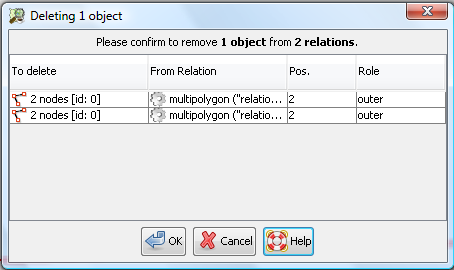
[[TranslatedPages]] = Delete mode = [[Image(source:trunk/images/mapmode/delete.png)]] ''Shortcut key:'' **`Ctrl₊Delete`** Delete nodes, segments, ways and relations by a single mouse click. All possibly affected objects are highlighted in the Map View. === Usage === 0. Clear the Selection by **`[Esc]`** or Unselect All.\\ Otherwise the Selection and **all referring objects** to it get deleted by entering this mode.\\ 1. Enter the Delete mode by shortcut key or via the [wikitr:/Help/EditToolbar#Workingmode Edit toolbar].\\ The cursor changes. 1. Click on nodes, way segments and ways to delete them. Modifiers: * `Shift` to remove only a way segment.\\ The remaining parts os the way are split apart. * `Alt` to spare the nodes of a way. \\ These nodes will remain even when they are unused. * `Ctrl` to additionally delete all [Concepts/Object objects] which reference the selected object **without further warning**, relations included. The definition of ''reference'' is: * a node references all ways it is connected to * an object references all relations it is member of * a simple way which is not a member of a relation has no references. ⏩ The cursor changes according to the affected objects. {{{#!comment the anchor is a help topic }}} === Deleting objects being members of relations === #DeleteFromRelations If you delete an [Concepts/Object object] which is part of a [Concepts/Object#Relations relation] the [Concepts/Object object] has to be removed from the [Concepts/Object#Relations relation]. JOSM doesn't silently do so. Rather, the following confirmation dialog is displayed: [[Image(confirm-delete-from-relations.png)]] The entries in the displayed list indicate from which [Concepts/Object#Relations relations] (second column in the table) the [Concepts/Object object] (or the objects, if you delete more than one object) have to be removed. Click '''Cancel''' if you don't want to remove the [Concepts/Object objects] from these [Concepts/Object#Relations relations]. In this case, JOSM doesn't delete the [Concepts/Object objects] either, the operation is aborted. Click '''OK''' if you agree with removing the [Concepts/Object objects] from the displayed [Concepts/Object#Relations relations]. == See also == * Simple [[Image(source:trunk/images/dialogs/delete.svg,20)]] [wikitr:/Help/Action/EditDelete Delete] as tool ---- Back to [wikitr:/Help Main help]
Note:
See
WikiFormatting
and
TracWiki
for help on editing wiki content.
Change information
Your email or username:
E-mail address and name can be saved in the
Preferences
Comment about this change (optional):
Attachments
(1)
confirm-delete-from-relations.png
(
25.8 KB
) - added by
Gubaer
16 years ago
.
Download all attachments as:
.zip
Note:
See
TracWiki
for help on using the wiki.