Search:
Login
Preferences
Help/Guide
About Trac
Register
Forgot your password?
Wiki
Timeline
Changelog
Browse Source
View Tickets
New Ticket
Roadmap
Builds
Sonar
Search
Context Navigation
+0
Start Page
Index
History
Editing Es:Help/Action/Delete
Adjust edit area height:
8
12
16
20
24
28
32
36
40
Edit side-by-side
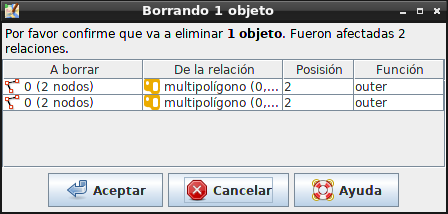
[[TranslatedPages(revision=22)]] = Editar > Borrar = [[Image(source:/trunk/images/dialogs/delete.png)]] ''Atajo de teclado:'' '''{{{D}}}''' '''Permite al usuario borrar nodos y otros [wiki:Es:Help/Concepts/Object objetos].''' [[TOC(inline)]] == Borrando objetos == El usuario puede hacer clic en un [wiki:Es:Help/Concepts/Object objeto], que se eliminará si es posible. * Si un nodo no es parte de una vía, entonces el nodo se elimina. * Si un nodo es parte de una vía, entonces el nodo se elimina. * Si el nodo estaba en el final de una vía, la vía se acorta. * Si el nodo estaba en medio de la vía, la vía es cambiada para que cubra el trayecto entre los nodos restantes. * Si el usuario hace clic en una vía, entonces la vía y los nodos asociados no utilizados por ninguna otra cosa, se eliminan. When '''{{{Alt}}}''' is held when using this tool the way and its' associated unused nodes are deleted. Cuando se utiliza '''{{{Shift}}}''' usando esta herramientas, el segmento sobre el cual se ha hecho clic se quita de la vía y la vía se divide en dos. When '''{{{Ctrl}}}''' is pressed when releasing the button, los [wiki:/Help/Concepts/Object objetos] y todas sus referencias se eliminadas. La definición exacta de ''todas estas referencias'' son: * Si un nodo es eliminado, el nodo y todas las vías y áreas donde el nodo es parte también son eliminados. * Si una vía es eliminada, sólo la vía, pero no los nodos se eliminan. * Si un área es eliminada, sólo el área se elimina. The following key shortcuts are defined: * If the user did not press '''{{{Ctrl}}}''' and the object has any references, the user is informed and nothing is deleted. '''Note:''' in some Linux desktop environment (e.g. KDE) the Alt-click event is captured to perform actions like dragging the window across the screen. To reclaim this combination to Josm you have to open the Control Center, click on Desktop, Window Behaviour, Actions and change the modifier key to something different than '''{{{Alt}}}'''. == Deleting objects being part of relations == #DeleteFromRelations If you delete an [wiki:/Help/Concepts/Object object] which is part of a [wiki:/Help/Concepts/Object relation] the [wiki:/Help/Concepts/Object object] has to be removed from the [wiki:/Help/Concepts/Object relation]. JOSM doesn't silently do so. Rather, the following confirmation dialog is displayed: [[Image(wiki:Help/Action/Delete:confirm-delete-from-relations.png)]] The entries in the displayed list indicate from which [wiki:/Help/Concepts/Object relations] (second column in the table) the [wiki:/Help/Concepts/Object object] (or the objects, if you delete more than one object) have to be removed. Click '''Cancel''' if you don't want to remove the [wiki:/Help/Concepts/Object objects] from these [wiki:/Help/Concepts/Object relations]. In this case, JOSM doesn't delete the [wiki:/Help/Concepts/Object objects] either, the operation is aborted. Click '''OK''' if you agree with removing the [wiki:/Help/Concepts/Object objects] from the displayed [wiki:/Help/Concepts/Object relations]. == Véase también == * [wiki:Es:Help/Concepts/Object Objetos] * [wiki:Es:Help/EditToolbar Barra de herramientas para editar] ---- Volver a [wiki:Es:Help/Menu/Edit Menu Editar][[Br]] Volver a [wiki:Es:Help Ayuda principal]
Note:
See
WikiFormatting
and
TracWiki
for help on editing wiki content.
Change information
Your email or username:
E-mail address and name can be saved in the
Preferences
Comment about this change (optional):
Attachments
(1)
confirm-delete-from-relations.png
(
17.8 KB
) - added by
ovruni
9 years ago
.
Download all attachments as:
.zip
Note:
See
TracWiki
for help on using the wiki.