


Opened 2 years ago
Last modified 2 years ago
#23720 closed defect
Geotagged images within same second show in reverse order — at Version 1
| Reported by: | pbb | Owned by: | team |
|---|---|---|---|
| Priority: | normal | Milestone: | |
| Component: | Core image mapping | Version: | |
| Keywords: | template_report | Cc: |
Description (last modified by )
What steps will reproduce the problem?
- Load a number of geotagged images, with some of them taken within the same second but with different fractional second (eg 00:00:00.1 and 00:00:00.9).
- Browse through the images using the geotagged images viewer, using the Previous and Next buttons.
- Notice how the for the images within the same second, the last image is shown first and after that the first image.
What is the expected result?
Images within the same second, but with different subseconds, should display in the correct order.
What happens instead?
The last image is shown first, and the first image last.
Please provide any additional information below. Attach a screenshot if possible.
I am taking many photos for Mapillary and Panoramax. This involves taking large numbers of geotagged photos about every 1-2 seconds. Because of processing delays, it regularly happens to photos are timestamped within the same second (though they have different subseconds).
Loading these photos in JOSM, they are displayed at the correct location, and with the correct timestamp (though the geotagged photos viewer only displays whole seconds). But using the Next/Previous buttons, it is clear they are not in the correct order.
The situation becomes even more interesting when the images to a GPX file (right-click on the Geotagged Images layer to export) and loading that back into JOSM; it seems that in the GPX track the locations of some of the images are swapped, causing the GPX track to also go back and forth.
Browsing the images in GeoSetter shows no problem, but loading the GPX track in GeoSetter also shows the back and forth.
Relative:URL: ^/trunk
Repository:UUID: 0c6e7542-c601-0410-84e7-c038aed88b3b
Last:Changed Date: 2024-06-03 18:08:14 +0200 (Mon, 03 Jun 2024)
Revision:19096
Build-Date:2024-06-04 01:31:15
URL:https://josm.openstreetmap.de/svn/trunk

Identification: JOSM/1.5 (19096 en_GB) Windows 10 64-Bit
OS Build number: Windows 10 Home 22H2 (19045)
Memory Usage: 1264 MB / 2020 MB (111 MB allocated, but free)
Java version: 21.0.2+13-58, Oracle Corporation, OpenJDK 64-Bit Server VM
Look and Feel: com.sun.java.swing.plaf.windows.WindowsLookAndFeel
Screen: \Display0 1920×1080 (scaling 1.00×1.00)
Maximum Screen Size: 1920×1080
Best cursor sizes: 16×16→32×32, 32×32→32×32
System property file.encoding: UTF-8
System property sun.jnu.encoding: Cp1252
Locale info: en_GB
Numbers with default locale: 1234567890 -> 1234567890
VM arguments: [-Djosm.cache=<josm.pref>\cache, -Djosm.userdata=<josm.pref>, -Djosm.pref=<josm.pref>]
Dataset consistency test: No problems found

Plugins:
+ ImproveOsm (247)
+ Mapillary (3904)
+ PicLayer (1.0.3)
+ apache-commons (36176)
+ ejml (36176)
+ geotools (36176)
+ jackson (36176)
+ jaxb (36118)
+ jts (36004)
+ opendata (36256)
+ photo_geotagging (36178)
+ photoadjust (36200)
+ reverter (36256)
+ tageditor (36258)
+ turnlanes-tagging (0.0.5)
+ turnrestrictions (36226)
+ undelete (36226)
+ utilsplugin2 (36241)

Map paint styles:
+ https://josm.openstreetmap.de/josmfile?page=Styles/Potlatch2&zip=1
- https://josm.openstreetmap.de/josmfile?page=Styles/Lane_and_Road_Attributes&zip=1

Last errors/warnings:
- 00001.148 W: extended font config - overriding 'filename.Malgun_Gothic=malgun.ttf' with 'MALGUN.TTF'
- 00001.151 W: extended font config - overriding 'filename.Myanmar_Text=mmrtext.ttf' with 'MMRTEXT.TTF'
- 00001.152 W: extended font config - overriding 'filename.Mongolian_Baiti=monbaiti.ttf' with 'MONBAITI.TTF'
- 00007.184 W: Unable to request certificate of https://roottest-g3.pkioverheid.nl
- 00007.653 W: Unable to request certificate of https://roottest-g3.pkioverheid.nl
- 00028.178 W: Region [TMS_BLOCK_v2] : Problem verifying disk.
Change History (8)
by , 2 years ago
comment:1 by , 2 years ago
| Description: | modified (diff) |
|---|
by , 2 years ago
| Attachment: | 2024_05_29_09_11_15_039_+0200.jpg added |
|---|
by , 2 years ago
| Attachment: | 2024_05_29_09_11_15_946_+0200.jpg added |
|---|
by , 2 years ago
| Attachment: | 2024_05_29_09_11_17_071_+0200.jpg added |
|---|
by , 2 years ago
| Attachment: | 2024_05_29_09_11_17_941_+0200.jpg added |
|---|
by , 2 years ago
| Attachment: | 2024_05_29_09_11_18_776_+0200.jpg added |
|---|
by , 2 years ago
| Attachment: | 2024-06-08 02_46_46-_ Java OpenStreetMap Editor.png added |
|---|
JOSM screenshot



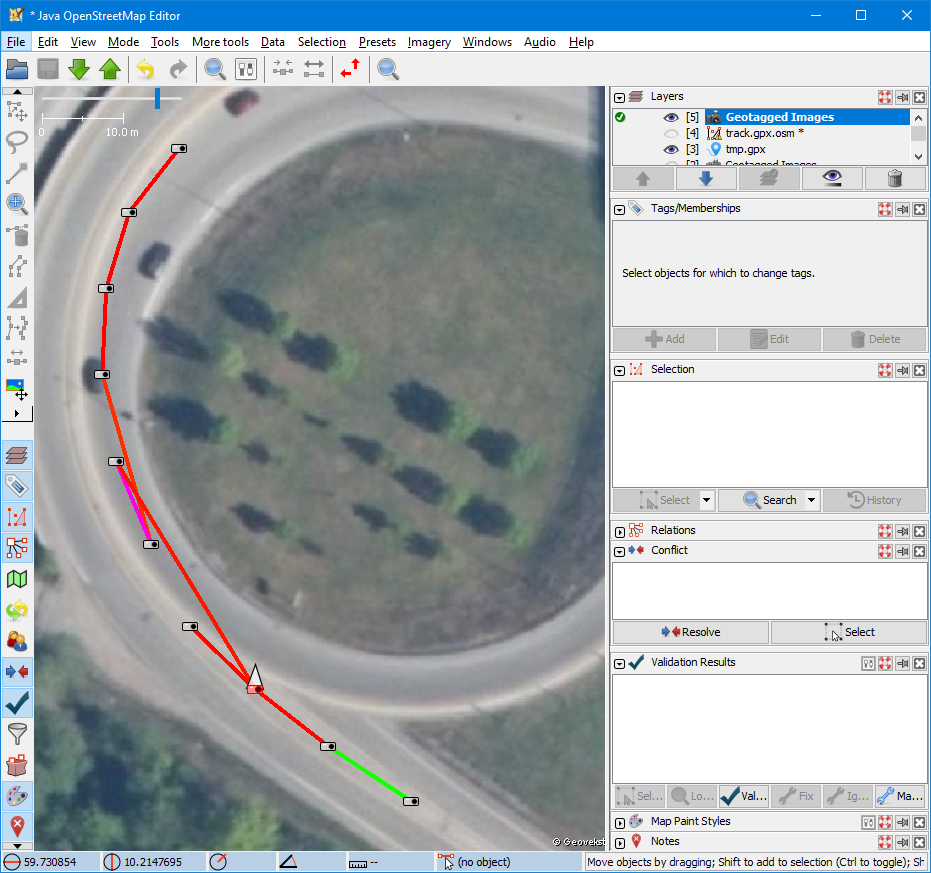
GPX track that jumps back and forth in JOSM only