


Opened 6 years ago
Last modified 6 years ago
#19510 closed enhancement
Add "Zoom to layer" in context menu of layers in the Layers panel — at Version 3
| Reported by: | matthijs | Owned by: | team |
|---|---|---|---|
| Priority: | normal | Milestone: | 20.08 |
| Component: | Core | Version: | |
| Keywords: | template_report zoom layer | Cc: |
Description (last modified by )
I often work on a few different things at the same time, sometimes far apart geographically. If so, I often download different parts of the map in different layers. Switching between layers is now not as easy as it could be. I have to activate a different layer, but then manually find it in the map (i.e. zoom out, see what bit of data is the right one, zoom back in). Alternatively, doing a select-all after activating a layer allows doing right-click and "zoom to selection" in the "Selection window", but that's still a bit cumbersome (and it took me a while to find this possibility).
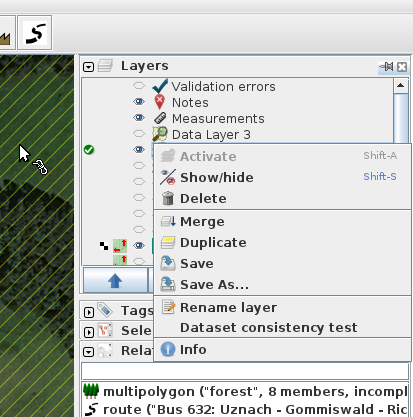
What would help if I could right-click a layer in the "Layers" window, and select a (to be added) "Zoom to" option (similar like the "Zoom to selection" option in the "Selection" window, or the "zoom to" option for members when editing a relation).

Relative:URL: ^/trunk
Repository:UUID: 0c6e7542-c601-0410-84e7-c038aed88b3b
Last:Changed Date: 2020-06-30 19:13:42 +0200 (Tue, 30 Jun 2020)
Revision:16731
Build-Date:2020-07-01 01:30:51
URL:https://josm.openstreetmap.de/svn/trunk

Identification: JOSM/1.5 (16731 en) Linux Ubuntu 19.10
Memory Usage: 406 MB / 2048 MB (146 MB allocated, but free)
Java version: 11.0.7+10-post-Ubuntu-2ubuntu219.10, Ubuntu, OpenJDK 64-Bit Server VM
Look and Feel: javax.swing.plaf.metal.MetalLookAndFeel
Screen: :0.0 1280x800 (scaling 1.0x1.0)
Maximum Screen Size: 1280x800
Best cursor sizes: 16x16 -> 16x16, 32x32 -> 32x32
Java package: openjdk-11-jre:amd64-11.0.7+10-2ubuntu2~19.10
WebStart package: icedtea-netx:amd64-1.8-0ubuntu8
Java ATK Wrapper package: libatk-wrapper-java:all-0.35.0-3
libcommons-logging-java: libcommons-logging-java:all-1.2-2
fonts-noto: fonts-noto:-
VM arguments: [--add-reads=java.base=ALL-UNNAMED,java.desktop, --add-reads=java.desktop=ALL-UNNAMED,java.naming, --add-reads=java.naming=ALL-UNNAMED,java.desktop, --add-exports=java.desktop/sun.awt=ALL-UNNAMED,java.desktop, --add-exports=java.desktop/javax.jnlp=ALL-UNNAMED,java.desktop, --add-exports=java.base/com.sun.net.ssl.internal.ssl=ALL-UNNAMED,java.desktop, --add-exports=java.base/sun.net.www.protocol.jar=ALL-UNNAMED,java.desktop, --add-exports=java.base/sun.security.action=ALL-UNNAMED,java.desktop, --add-exports=java.base/sun.security.provider=ALL-UNNAMED,java.desktop, --add-exports=java.base/sun.security.util=ALL-UNNAMED,java.desktop, --add-exports=java.base/sun.security.validator=ALL-UNNAMED,java.desktop, --add-exports=java.base/sun.security.x509=ALL-UNNAMED,java.desktop, --add-exports=java.base/jdk.internal.util.jar=ALL-UNNAMED,java.desktop, --add-exports=java.base/sun.net.www.protocol.http=ALL-UNNAMED,java.desktop, --add-exports=java.desktop/sun.awt.X11=ALL-UNNAMED,java.desktop, --add-exports=java.desktop/sun.applet=ALL-UNNAMED,java.desktop, --add-exports=java.desktop/sun.applet=ALL-UNNAMED,jdk.jsobject, --add-exports=java.naming/com.sun.jndi.toolkit.url=ALL-UNNAMED,java.desktop, -Dicedtea-web.bin.name=javaws, -Dicedtea-web.bin.location=/usr/lib/icedtea-web/bin/javaws]
Dataset consistency test: No problems found

Plugins:
+ measurement (35405)
+ utilsplugin2 (35487)

Last errors/warnings:
- E: Region [TMS_BLOCK_v2] : Failure getting from disk, key = Esri World Imagery (Clarity) Beta:https://clarity.maptiles.arcgis.com/arcgis/rest/services/World_Imagery/MapServer/tile/{zoom}/{y}/{x}/15/17179/11555
- E: Region [TMS_BLOCK_v2] : Failure getting from disk, key = Esri World Imagery (Clarity) Beta:https://clarity.maptiles.arcgis.com/arcgis/rest/services/World_Imagery/MapServer/tile/{zoom}/{y}/{x}/14/8589/5777
- W: java.net.UnknownHostException: clarity.maptiles.arcgis.com
- W: Already here java.net.UnknownHostException: clarity.maptiles.arcgis.com
- W: java.net.UnknownHostException: clarity.maptiles.arcgis.com
- E: Region [TMS_BLOCK_v2] : Failure getting from disk, key = Esri World Imagery (Clarity) Beta:https://clarity.maptiles.arcgis.com/arcgis/rest/services/World_Imagery/MapServer/tile/{zoom}/{y}/{x}/15/17178/11555
- W: Already here java.net.UnknownHostException: clarity.maptiles.arcgis.com
- W: java.net.UnknownHostException: clarity.maptiles.arcgis.com
- W: Already here java.net.UnknownHostException: clarity.maptiles.arcgis.com
- W: Already here java.net.UnknownHostException: clarity.maptiles.arcgis.com
Change History (4)
comment:1 by , 6 years ago
| Keywords: | zoom layer added |
|---|---|
| Owner: | changed from to |
| Status: | new → needinfo |
by , 6 years ago
| Attachment: | Screenshot from 2020-07-10 17-15-06.png added |
|---|
Screenshot of popup menu where a new option is suggested
comment:2 by , 6 years ago
You are talking about the relation editor, right?
No, the layers dialog in the main window.
Note Zoom to layer for mapview and additional actions Zoom to previous, Zoom to next and Zoom to download with their cycles.
Aha, "View > Zoom to layer" is pretty much exactly what I needed. It's also in a fairly logical place, not sure why I missed that.
Still, it might be worth to consider adding a "Zoom to layer" option to the data layer popup menu, e.g. in this menu: 
comment:3 by , 6 years ago
| Description: | modified (diff) |
|---|---|
| Owner: | changed from to |
| Status: | needinfo → new |
| Summary: | Add "Zoom to layer" option → Add "Zoom to layer" in context menu of layers in the Layers panel |

You are talking about the relation editor, right?
Please, describe in more details your problem. A screenshot could help, too. Thanks
Note Zoom to layer for mapview and additional actions Zoom to previous, Zoom to next and Zoom to download with their cycles.