Opened 6 years ago
Last modified 5 years ago
#19215 new defect
Import Vector Dialog Hidden by Opening Files Dialog — at Initial Version
| Reported by: | anonymous | Owned by: | team |
|---|---|---|---|
| Priority: | minor | Milestone: | |
| Component: | Plugin importvec | Version: | latest |
| Keywords: | modal dialog | Cc: |
Description
- Start JOSM from the command line:
java -jar josm-latest.jar
- Accept any and all prompts that appear.
- Click File 🠚 Preferences.
- Click the plugin icon.
- Click Download to download a list of all plugins.
- Set Search to: vec
- Check importvec (see the plugin documentation).
- Click OK.
Import a vector graphic as follows:
- Click File 🠚 New Layer.
- Click File 🠚 Open.
- Browse to and select voronoi-cracks.svg.
- Click Open.
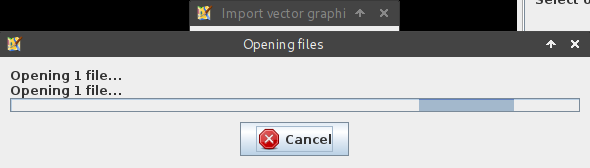
At this point, you may encounter a bug in JOSM whereby the Opening Files dialog hides the Import vector graphic dialog.
Continue as follows:
- Click × to close the dialog box.
Note: the Cancel button has no effect (a secondary bug).
Note:
See TracTickets
for help on using tickets.