


Opened 8 years ago
Last modified 8 years ago
#16691 closed defect
Scripting tab disappeard from preferences — at Initial Version
| Reported by: | watergeus | Owned by: | team |
|---|---|---|---|
| Priority: | normal | Milestone: | |
| Component: | Core | Version: | latest |
| Keywords: | template_report | Cc: |
Description
What steps will reproduce the problem?
- No idea. Installed ver 14178 at aug 22 2018 Java ver 1.8.0_181
- It was available in previous versions
What is the expected result? show and use the Scriping tag
What happens instead? Disapeared
Please provide any additional information below. Attach a screenshot if possible.
URL:https://josm.openstreetmap.de/svn/trunk
Repository:UUID: 0c6e7542-c601-0410-84e7-c038aed88b3b
Last:Changed Date: 2018-08-22 19:44:25 +0200 (Wed, 22 Aug 2018)
Build-Date:2018-08-22 17:46:33
Revision:14178
Relative:URL: ^/trunk

Identification: JOSM/1.5 (14178 en) Windows 10 64-Bit
OS Build number: Windows 10 Enterprise 1803 (17134)
Memory Usage: 630 MB / 1820 MB (452 MB allocated, but free)
Java version: 1.8.0_181-b13, Oracle Corporation, Java HotSpot(TM) 64-Bit Server VM
Screen: \Display0 1680x1050, \Display1 1680x1050
Maximum Screen Size: 1680x1050
Dataset consistency test: No problems found

Plugins:
+ FastDraw (34510)
+ ImproveOsm (139)
+ ShapeTools (1230)
+ SimplifyArea (34586)
+ buildings_tools (34572)
+ changeset-viewer (15)
+ continuosDownload (1530471163)
+ ejml (34389)
+ geochat (34512)
+ geojson (87)
+ geotools (34513)
+ gson (34389)
+ imagery_offset_db (34506)
+ jna (34492)
+ jogl (1.2.1)
+ jts (34524)
+ log4j (34527)
+ mapathoner (v0.5.16)
+ markseen (7)
+ measurement (34529)
+ merge-overlap (34530)
+ reltoolbox (34551)
+ reverter (34552)
+ terracer (34584)
+ todo (30305)
+ tofix (481)
+ touchscreenhelper (34206)
+ turnrestrictions (34576)
+ utilsplugin2 (34506)

Tagging presets:
+ https://josm.openstreetmap.de/josmfile?page=Presets/HotNepal&zip=1
+ https://josm.openstreetmap.de/josmfile?page=Presets/Quick-highways&zip=1

Map paint styles:
+ https://github.com/MissingMaps/josm_styles/archive/master.zip
- https://josm.openstreetmap.de/josmfile?page=Styles/Fixme&zip=1
- https://github.com/MarkCupitt/HOT-Osm-Validation/blob/master/HOT-Validate.mapcss
+ https://github.com/hotosm/HDM-JOSM-style/archive/master.zip
+ %UserProfile%\Desktop\JOSM\HOT-Osm-Validation-master.zip
- %UserProfile%\Desktop\JOSM\Styles_Highway_Nodes.zip
+ https://github.com/osmlab/appledata/archive/josm_paint_inline_validation.zip

Last errors/warnings:
- W: Failed to parse Mappaint styles from 'https://github.com/MarkCupitt/HOT-Osm-Validation/blob/master/HOT-Validate.mapcss'. Error was: Encountered " "<" "< "" at line 7, column 1.
- E: org.openstreetmap.josm.gui.mappaint.mapcss.parsergen.ParseException: Encountered " "<" "< "" at line 7, column 1.
- W: Not a single layer for the name 'Tasking Manager Imagery - #4747': []
- W: Not a single layer for the name 'Tasking Manager Imagery - #4747': []
- W: Not a single layer for the name 'Tasking Manager Imagery - #4747': []
- W: Not a single layer for the name 'Tasking Manager Imagery - #4840': []
- W: No configuration settings found.  Using hardcoded default values for all pools.
- W: Failed to scan file 'site-github.com-_maripo_JOSM_easypresets_git.txt' for plugin information. Skipping.
- E: org.openstreetmap.josm.plugins.PluginListParseException: java.io.IOException: Illegal entry in plugin list.. Cause: java.io.IOException: Illegal entry in plugin list.
- E: Failed to locate image 'icons/bus_stop.png'
Note:
See TracTickets
for help on using tickets.


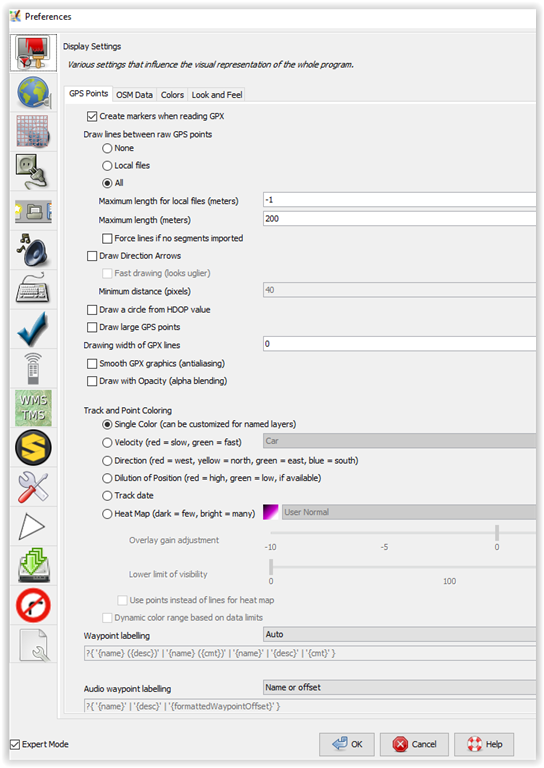
Preferences tab