


Modify ↓
Opened 8 years ago
Closed 8 years ago
#16305 closed defect (worksforme)
wrong old java warning on macOS
| Reported by: | dieterdreist | Owned by: | dieterdreist |
|---|---|---|---|
| Priority: | normal | Milestone: | |
| Component: | Core | Version: | |
| Keywords: | template_report macos | Cc: |
Description (last modified by )
What steps will reproduce the problem?
- startup JOSM
What is the expected result?
-
What happens instead?
get a warning popup to update java, s. screenshot
Please provide any additional information below. Attach a screenshot if possible.

Relative:URL: ^/trunk
Repository:UUID: 0c6e7542-c601-0410-84e7-c038aed88b3b
Last:Changed Date: 2018-05-22 02:42:11 +0200 (Tue, 22 May 2018)
Revision:13817
Build-Date:2018-05-22 01:33:12
URL:https://josm.openstreetmap.de/svn/trunk

Identification: JOSM/1.5 (13817 en) Mac OS X 10.13.4
OS Build number: Mac OS X 10.13.4 (17E202)
Memory Usage: 256 MB / 2048 MB (55 MB allocated, but free)
Java version: 10+46, Oracle Corporation, Java HotSpot(TM) 64-Bit Server VM
Screen: Display 188875522 1920x1080, Display 458628992 1920x1080
Maximum Screen Size: 1920x1080
VM arguments: [-Dsun.java2d.opengl=true]

Plugins:
+ ColorPlugin (1511895663)
+ Create_grid_of_ways (34109)
+ ImportImagePlugin (34109)
+ PicLayer (34170)
+ ShapeTools (1230)
+ apache-commons (34109)
+ buildings_tools (34212)
+ editgpx (34109)
+ ejml (34126)
+ fieldpapers (v0.4.3)
+ geochat (34109)
+ geojson (80)
+ geotools (34125)
+ imagery_offset_db (34209)
+ jts (34038)
+ log4j (34038)
+ mbtiles (a3e491d)
+ measurement (34109)
+ o5m (34109)
+ osmarender (34096)
+ pbf (34109)
+ photo_geotagging (34109)
+ reltoolbox (34212)
+ reverter (34109)
+ undelete (34109)
+ utilsplugin2 (34109)

Last errors/warnings:
- W: Invalid jar file ''<josm.userdata>/plugins/buildings_tools.jar.new'' (exists: false, canRead: false)
- W: Invalid jar file ''<josm.userdata>/plugins/reltoolbox.jar.new'' (exists: false, canRead: false)
- W: No configuration settings found.  Using hardcoded default values for all pools.
- W: Cannot start IPv4 remotecontrol https server on port 8112: Keystore was tampered with, or password was incorrect
- W: Cannot start IPv6 remotecontrol https server on port 8112: Keystore was tampered with, or password was incorrect
Attachments (3)
Change History (10)
by , 8 years ago
| Attachment: | Screen Shot 2018-05-22 at 18.34.03.png added |
|---|
by , 8 years ago
| Attachment: | Screen Shot 2018-05-22 at 18.38.04.png added |
|---|
by , 8 years ago
| Attachment: | Screen Shot 2018-05-22 at 18.38.12.png added |
|---|
comment:1 by , 8 years ago
| Owner: | changed from to |
|---|---|
| Status: | new → needinfo |
comment:2 by , 8 years ago
| Description: | modified (diff) |
|---|
comment:3 by , 8 years ago
| Keywords: | macos added |
|---|---|
| Summary: | wrong old java warning on OSX → wrong old java warning on macOS |
comment:4 by , 8 years ago
| Keywords: | macos removed |
|---|---|
| Summary: | wrong old java warning on macOS → wrong old java warning on OSX |
Maybe yes, it would not be the first time, already happened in the past, basically Java isn't very smoothly integrated on Macs since Apple dropped support some years ago.
I've found another version at: /Library/Internet Plug-Ins/JavaAppletPlugin.plugin/Contents/Home/bin/java
although it is in "Internet Plugins", it is a command line java reporting this version: Java(TM) SE Runtime Environment 18.3 (build 10.0.1+10)
comment:5 by , 8 years ago
sudo rm /usr/bin/java
Password:
rm: /usr/bin/java: Operation not permitted
I'll have to put a link where it links to.
The version in /Library/Internet Plug-Ins/JavaAppletPlugin.plugin/Contents/Home/bin/java isn't shown:
$ /usr/libexec/java_home -V
Matching Java Virtual Machines (2):
    10, x86_64:	"Java SE 10"	/Library/Java/JavaVirtualMachines/jdk-10.jdk/Contents/Home
    1.8.0_144, x86_64:	"Java SE 8"	/Library/Java/JavaVirtualMachines/jdk1.8.0_144.jdk/Contents/Home
comment:6 by , 8 years ago
| Keywords: | macos added |
|---|---|
| Summary: | wrong old java warning on OSX → wrong old java warning on macOS |
comment:7 by , 8 years ago
| Resolution: | → worksforme |
|---|---|
| Status: | needinfo → closed |
So you should make sure at least the first entry listed above is up-to-date.
Note:
See TracTickets
for help on using tickets.



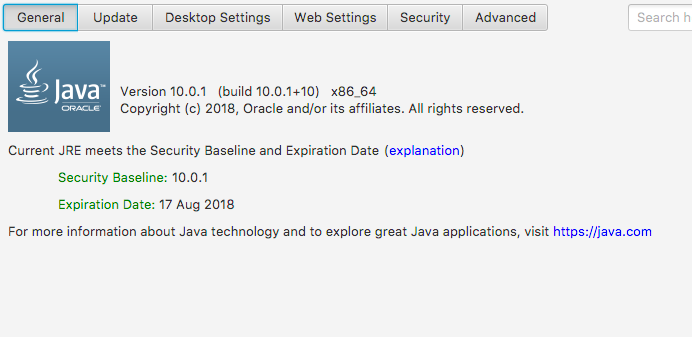

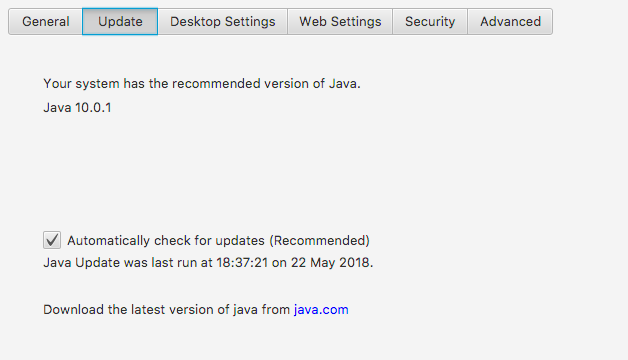
Your status says: Java version: 10+46, Oracle Corporation, Java HotSpot(TM) 64-Bit Server VM
That's Java 10 and not 10.0.1 → http://www.muchsoft.com/java/macosxjavaversions.html
Maybe you have more than 1 version installed and JOSM does not access the newest one?